

The Nintendo e-Reader plugs into a Game Boy Advance SP's Game Pak slot like a cartridge, not into the link port — you insert it, swipe a dot-code card through the built-in scanner, and either play the content on that same screen or push it into a second, linked GBA SP running the target game. Which workflow you need depends on the card: e-Reader-native games run standalone, Pokémon dot-code unlocks need two consoles and a link cable.
- A gameboy advance e-reader setup takes one console for standalone -e cards, two linked consoles for Pokémon dot-code unlocks.
- US e-Reader cards only read on a US e-Reader; Japanese e-Reader+ cards only read on a Japanese e-Reader+ — the encoding is region-locked.
- The e-Reader draws power from 2 AA batteries, independent of the GBA SP's own charge, so a flat e-Reader battery is the top cause of a failed scan.
- A modded GBA SP with a working link port and an IPS V5 screen runs the e-Reader exactly like an original 2003 unit — the screen mod changes nothing about the Game Pak slot or link port.
Why this matters in 2026
The e-Reader has been out of production since 2004, but the dot-code cards that unlock Eon Ticket, Old Sea Map and Mystic Ticket events in Pokémon Ruby, Sapphire, Emerald, FireRed and LeafGreen still circulate on secondhand marketplaces in 2026, and collectors keep asking whether a link port on a refurbished or modded console still talks to a 20-year-old peripheral. It does. The link protocol hasn't changed, and a screen or battery upgrade on a Game Boy Advance SP touches the display and power circuit, not the cartridge slot or link port.
What trips people up isn't the hardware, it's the workflow. Two card types, two different setups, and skipping the region check wastes more time than the scan itself.
Before you start
- An e-Reader unit that matches your cards — US/EU e-Reader (monochrome) for English-language dot-code cards, or a Japanese e-Reader+ (colour screen, built-in speaker) for Japanese cards. They are not interchangeable.
- 2 AA batteries for the e-Reader itself — it does not draw power from the GBA SP's battery or USB-C charging circuit.
- A GBA link cable if you're injecting card data into a Pokémon game rather than playing an e-Reader-native title. Check link cable accessories before assuming any Game Boy-era cable fits — the GBA connector is a different shape from the original Game Boy link cable.
The gotcha: region-mismatched cards look identical to the naked eye but scan as garbage data. If a card refuses to read cleanly on repeated attempts, confirm the card's region matches the e-Reader's region before touching the swipe speed or the sensor.
Set up the e-Reader unit
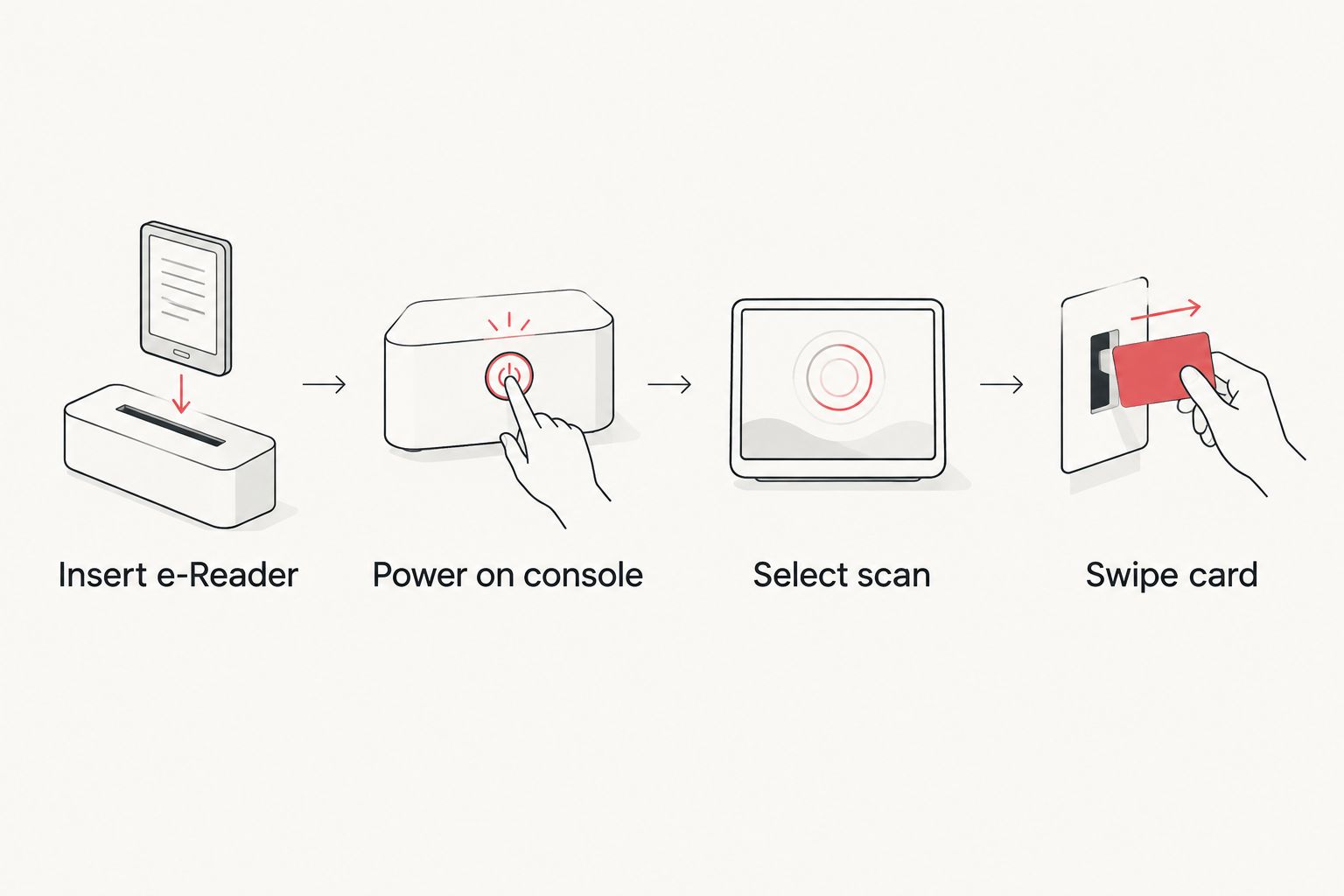
- Power off the Game Boy Advance SP completely.
- Insert 2 AA batteries into the e-Reader's battery compartment.
- Slide the e-Reader into the Game Pak slot on the back of the GBA SP, the same slot a normal cartridge uses.
- Power on the GBA SP. The e-Reader's own startup screen should appear (colour on e-Reader+, text-only on the standard US/EU unit).
Expected result: the console boots into the e-Reader's card-scan menu instead of a game menu. If it boots to a blank or frozen screen, reseat the e-Reader in the Game Pak slot — a loose connection is the most common first-boot failure.
Scan a card in standalone mode
This is the setup for e-Reader-native content: Animal Crossing-e series cards, Pokémon Trading Card Game battle cards, and Mario Party-e cards. No second console, no link cable.
- From the e-Reader's main menu, select the scan option.
- Hold the card face-down and swipe it through the slot on top of the e-Reader in one smooth, continuous motion — not too fast, not too slow.
- Watch for the confirmation tone or on-screen tick.
- The scanned content (a mini-game, a card battle, an Animal Crossing item) loads directly on the GBA SP's screen.
Expected result: content plays immediately on the same console, no game cartridge required.
Injecting dot-code data into Pokémon Ruby, Sapphire, Emerald, FireRed and LeafGreen
This is the workflow most people searching for a gameboy advance e-reader setup actually need — unlocking event items like the Eon Ticket or Old Sea Map inside a real Pokémon save file. It requires two Game Boy Advance units.
Connect the link cable
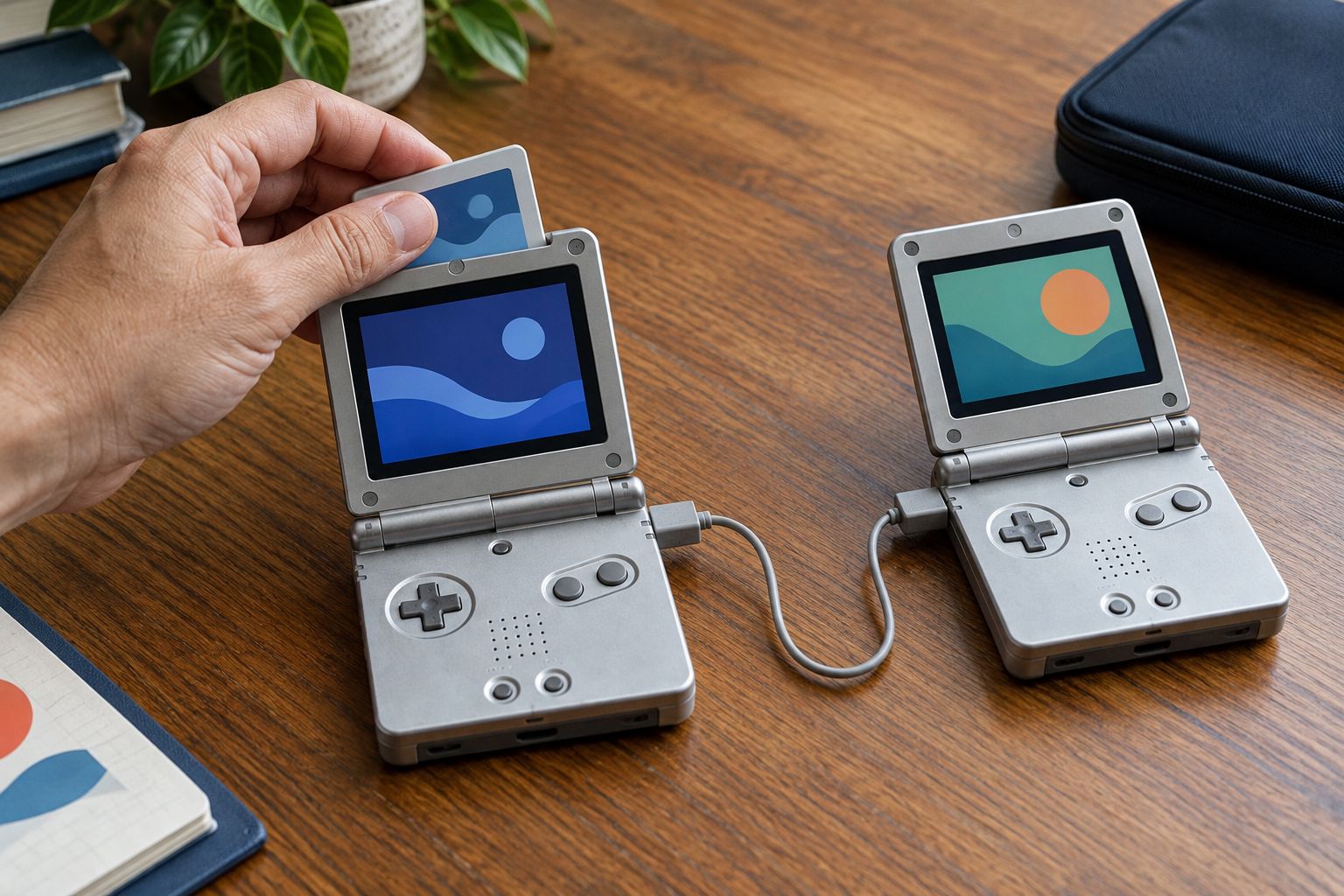
- Insert the e-Reader into the Game Pak slot of the first GBA SP.
- Insert the target Pokémon cartridge into the second GBA SP.
- Connect a GBA link cable between the link ports on top of both consoles.
- Power on the console running the Pokémon game first, and load the save file.
Expected result: the game's menu shows a connection option (in-game it's usually framed as a card or e-Reader linkup) once both consoles are powered and cabled.
Scan the card into the game
- In the Pokémon game, open the relevant in-game menu and select the e-Reader/card connection option.
- Power on the second GBA SP running the e-Reader and confirm the link on that side.
- Swipe the dot-code card through the e-Reader slot at a steady pace.
- Wait for both screens to confirm the transfer before disconnecting the cable.
Expected result: the item or event unlocks inside the Pokémon save file, visible the next time you check your bag or in-game mailbox.
Which GBA SP works best for this
Any working Game Boy Advance SP with an intact Game Pak slot and link port handles the e-Reader, including modded units with an IPS V5 screen and USB-C charging — those upgrades sit on the display and power board, not the cartridge or link circuitry. A console with a bright, colour-accurate screen matters more for reading e-Reader+ menus and Animal Crossing-e content clearly, which is where an IPS-modded unit like the Transparent Black IPS V5 edition has an edge over an unmodded original with a dim, non-backlit screen.


Retrofit's take: any working Game Boy Advance SP handles the e-Reader link protocol without modification, so pick the shell and screen upgrade you actually want to use daily — the e-Reader compatibility isn't a deciding factor either way. Buy an IPS V5-modded unit if the screen quality matters for reading e-Reader+ menus; hold onto an unmodded original if you're preserving it unchanged for collection value.
Troubleshooting
- Card won't scan at all. Check the e-Reader's AA batteries first — a dead battery produces no scan tone and a blank response, which looks identical to a bad card.
- Scan reads as corrupted or garbled. Region mismatch is the usual cause: a Japanese e-Reader+ card will not read cleanly on a US/EU e-Reader, and vice versa.
- Link cable connection isn't detected between the two consoles. Reseat the cable at both ends — the GBA link port is a snug fit and a half-inserted cable often still looks seated.
- e-Reader boots but freezes on the scan menu. Reseat the e-Reader in the Game Pak slot; a slightly loose cartridge connection causes exactly this symptom.
- Content unlocks on the e-Reader side but never appears in the Pokémon save. Confirm the in-game menu was actually left open on the connection screen before swiping — closing it early breaks the handshake even if the swipe itself worked.
“If the card doesn't scan on a slow, steady swipe, the problem is the region match or the battery, not the swipe technique.”
Customize your workflow
Once the base setup works, the e-Reader link cable connection is functionally the same GBA link port used for trading and multiplayer. If you're already running a link cable between two consoles, it's worth setting up trading Pokémon between a GBA SP and Nintendo DS in the same session rather than disconnecting and reconnecting later.
For longer e-Reader sessions across multiple cards, a modded GBA SP with USB-C charging keeps the receiving console topped up without swapping to a proprietary Nintendo charger mid-session — see how charging a modded GBA SP with USB-C works if you're running one of Retrofit's refurbished units.
FAQ
Does a modded GBA SP work with the Nintendo e-Reader in 2026?
Yes. A modded Game Boy Advance SP with an IPS V5 screen and USB-C charging works with the e-Reader exactly like an original 2003 console because the mod changes the display and power circuit, not the Game Pak slot or link port.
Do I need two Game Boy Advance consoles for a gameboy advance e-reader setup?
Only for injecting dot-code data into a Pokémon save file. Standalone e-Reader content like Animal Crossing-e or Pokémon Trading Card Game cards plays on a single console with no link cable.
Can a Japanese e-Reader+ read US e-Reader cards?
No. The dot-code encoding is region-locked, so a Japanese e-Reader+ only reads Japanese cards and a US/EU e-Reader only reads English-language cards.
What link cable does the e-Reader use?
A standard GBA link cable, the same one used for GBA-to-GBA multiplayer and trading. It is a different connector shape from the original Game Boy link cable.
Why does my e-Reader card scan as corrupted data?
Region mismatch is the most common cause, followed by a dirty or damaged card surface and swiping too fast or too slow through the sensor.
Does the e-Reader run on the GBA SP's own battery?
No. The e-Reader has its own compartment for 2 AA batteries, separate from the GBA SP's internal battery or USB-C charging circuit.
Can the e-Reader damage a GBA SP's link port or Game Pak slot?
No. It uses the same connectors as any standard cartridge and link cable, and normal use carries no more wear risk than a regular game cartridge.
One last thing
The most overlooked detail in any gameboy advance e-reader setup isn't the console, it's the card itself: Pokémon-e dot-code cards degrade with handling the same way trading cards do, and a scuffed or bent card fails a scan long before the console hardware is ever the problem. If a card that used to scan cleanly starts failing in 2026, check the card surface under good light before troubleshooting the e-Reader or the GBA SP.






