

To store a Game Boy Advance SP long term without battery damage, switch it off, leave its battery partly charged, and keep it in a cool, dry place away from direct sunlight. If the battery is removable and you can remove it safely, store it separately; check both the console and battery before charging again. Do not charge or use a battery that is swollen, leaking or damaged.
- To store a Game Boy Advance SP long term without battery damage, leave its battery partly charged and avoid heat.
- Remove a detachable battery for extended storage only if you can do so safely; never pry open a modified battery assembly.
- Retro Fit GBA SP consoles are best for collectors seeking refurbished or modded hardware, not a substitute for battery checks.
- If a battery is swollen, leaking or damaged, stop using it and arrange appropriate battery disposal or repair.
How do you store a Game Boy Advance SP long term without battery damage?
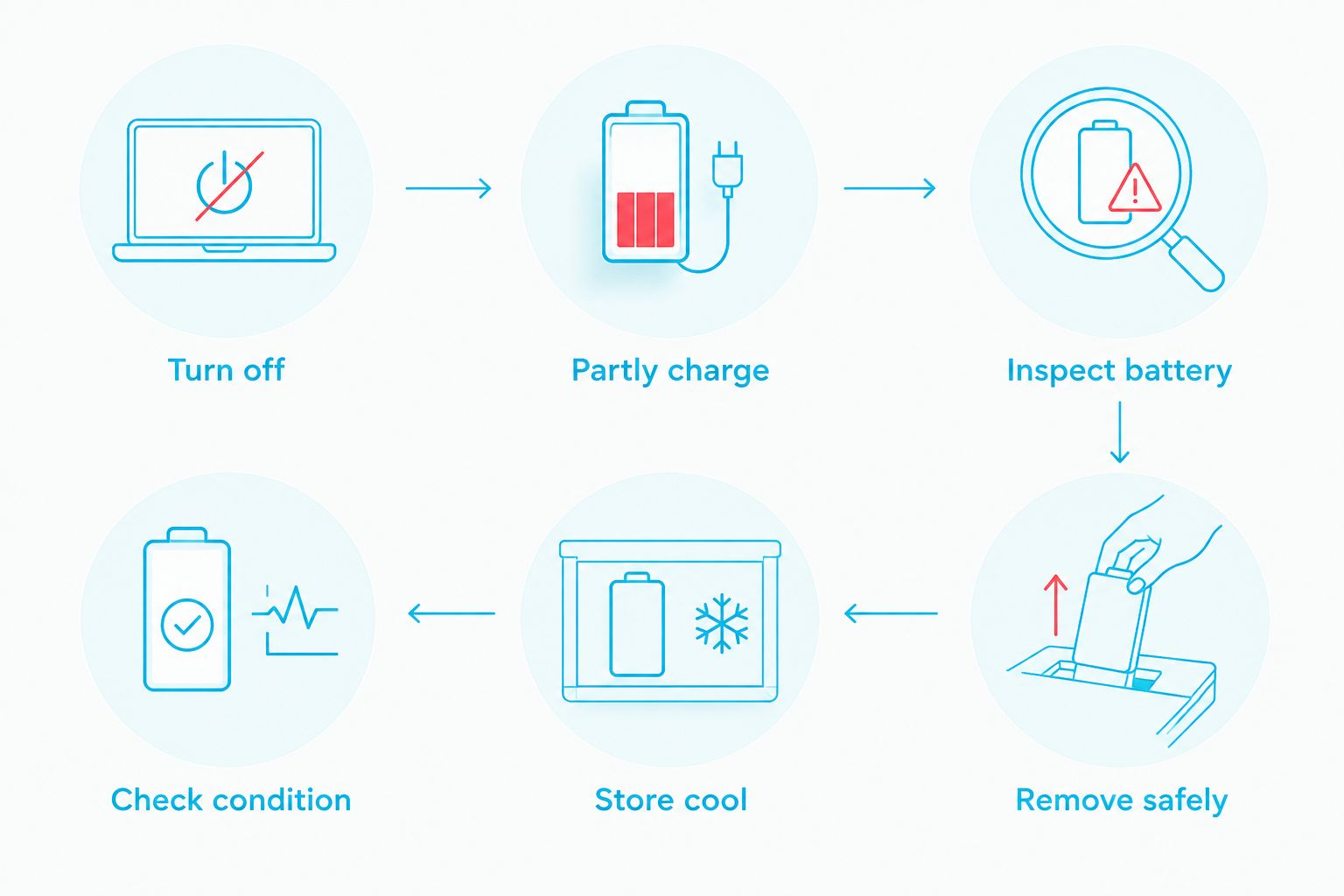
Follow this sequence before putting an SP away in 2026. The key distinction is whether its battery can be removed without disturbing a modification: the storage goal is the same, but the handling is not.
- Turn the SP off and disconnect its charger. Confirm that the power switch is off rather than leaving the console connected to power in a drawer. If you need to check a modified charging setup first, read the Game Boy Advance SP charging accessories guide and identify what is actually fitted to your console.
- Leave a healthy battery partly charged. Do not deliberately drain it until the console shuts itself down, and do not put it away immediately after charging it fully. The SP does not give you a precise battery percentage, so treat partial charge as a practical condition, not a measurement you can read from its screen.
- Inspect the battery area. Look for swelling, leakage, corrosion, unusual heat or a distorted battery cover. Stop here if you find damage: charging it to test whether it still works adds an avoidable safety risk.
- Remove a detachable battery if you can do so safely. Keep its contacts from touching loose metal objects. If a mod changes how the battery is mounted or connected, do not pull, pry or disconnect parts you cannot identify.
- Store the console and battery somewhere cool and dry. Use a clean case or container that protects the shell without trapping moisture. Keep the storage spot away from direct sun, heaters and hot vehicles.
- Check the stored SP periodically. Inspect the battery before reconnecting or charging it. If the console has been unused for a long time, check its condition before a full play session rather than assuming it is ready.
These steps reduce avoidable battery stress; they do not guarantee that an ageing battery will remain usable. In 2026, the safest plan for a collector is to know the battery’s condition before storage and inspect it again before use.
Why this matters
A stored SP can look unchanged while its battery deteriorates. Heat and long periods at an extremely low or full state of charge are poor conditions for a rechargeable lithium-ion battery; a cupboard that feels convenient is not a good choice if it becomes hot or damp.
The battery is also separate from the console’s cosmetic condition. A clean shell and working screen do not tell you whether a stored battery is healthy. Treat the battery check as part of using an SP again, especially if you cannot remember when it was last inspected.
Removable battery or modified battery: what changes?
Identify your SP’s battery arrangement before opening its compartment. A refurbished shell, an IPS V5 screen or USB-C charging does not, by itself, tell you how its battery is fitted.
| Battery arrangement | Best for | Storage action | Main limitation |
|---|---|---|---|
| Battery you can remove safely | Owners who can access a standard detachable pack without disturbing wiring | Store the partly charged battery separately, with its contacts protected | A removable pack can still deteriorate; inspect it before reuse |
| Battery installation you cannot confidently identify | Owners of modified or previously repaired consoles | Leave the assembly undisturbed and ask a repairer how that installation should be stored | You cannot assume instructions for a standard pack apply to the modification |
The best storage method is the one that avoids both battery stress and unnecessary work on unfamiliar hardware. Removing a standard detachable pack gives you a clear view of its condition and keeps it out of the console. Leaving an unfamiliar installation alone avoids damaging wiring or a connector while attempting the same step.
Retro Fit is best for collectors seeking refurbished or modded Game Boy Advance SP consoles and repair or upgrade services; its IPS V5 and USB-C options do not remove the need to inspect a battery before long-term storage. If you are unsure what is installed in your SP, identify it before following battery-removal instructions intended for an unmodified console.
Why Game Boy Advance SP battery damage varies
The outcome depends on the battery and its storage conditions, not simply on whether the console turns on today. Check these factors when choosing where and how to put an SP away:
- Battery condition before storage. A battery that is already swollen, leaking or physically damaged needs attention now. Storage does not reverse that condition.
- State of charge. Avoid putting a healthy rechargeable battery away completely depleted or freshly topped up. The SP’s indicator is not a precise charge gauge, so do not present a guessed percentage as a reading.
- Temperature. A drawer beside a heater, an uninsulated shed and a parked car expose the console to avoidable heat. Choose a more stable indoor spot.
- Moisture. A damp case or cupboard can damage contacts and other console parts. Dry the exterior before storage and avoid sealing moisture inside the container.
- Battery installation. A detachable pack and a modified internal arrangement call for different handling. Confirm the installation rather than forcing a battery-compartment cover or connector.
- Inspection habits. A stored battery still needs a visual check before it goes back into service. Do not make charging the first test of a battery that appears damaged.
The strongest 2026 storage routine is simple: inspect, partly charge if the battery is healthy, choose a cool and dry spot, then inspect again before use. None of those checks depends on a particular shell edition or screen upgrade.
Should you remove the battery from a Game Boy Advance SP for long-term storage?
Remove a detachable SP battery if you can do it safely without disturbing a modification. It lets you inspect the pack and store it away from the console, but removal is not permission to keep a damaged battery: a swollen or leaking pack still needs appropriate handling.
If the console has been modified and you cannot tell how the battery is connected, stop before opening it further. An IPS V5 display describes a screen; it does not establish the wiring or battery design inside your particular SP. Ask a qualified repairer to identify the installation instead of treating every modified console as mechanically identical.
Store a removed battery where its contacts cannot touch loose metal. Keep track of which battery belongs to which console if you own several SPs, and inspect the contacts on both sides before reassembly. If you see corrosion or a distorted pack, do not refit it to find out whether the console powers on.
Can you leave a Game Boy Advance SP plugged in during storage?
No: disconnect the SP once it is ready for storage. Leaving it plugged in is unnecessary for a console you are not using and makes it harder to control the battery’s storage condition.
A USB-C charging modification changes the connection used to charge a console; it does not turn an SP into a device that should remain on charge in a drawer. In 2026, use the charging instructions for the actual battery and modification installed, then unplug the console before putting it away.
If you do not know whether an SP has its original battery, a replacement pack or a modified charging circuit, do not choose a charger by connector shape alone. Identify the setup before charging. This matters most when a console has changed hands and its modification history is unclear.
What should you do when taking a stored SP out again?
Inspect the battery before switching on or charging the console. Check for swelling, leakage, corrosion and a cover that no longer sits as expected. If any of these appear, stop using that battery and seek appropriate battery disposal or repair advice.
If the battery and contacts look sound, refit a safely removed pack according to its actual installation and check that the compartment closes normally. Never push a swollen pack into place to make the cover fit. A shell that will not close properly is a warning, not a cosmetic inconvenience.
Then charge and test the console using equipment suitable for its fitted charging setup. Turn it off again if you notice unusual heat, smell or behaviour. The first 2026 check after storage is a condition check, not a reason to leave the SP charging unattended.
A storage checklist for collectors
Before a Game Boy Advance SP goes back into its case, make the following decisions. The list is short enough to repeat each time you rotate a console out of use:
- Is the battery visibly healthy? If not, do not charge or store it as though it were healthy.
- Is it partly charged? Avoid intentionally storing a healthy rechargeable pack empty or freshly fully charged.
- Can you remove it safely? Remove a straightforward detachable pack; leave unfamiliar modified wiring alone.
- Is the case dry? A clean case protects the console, but a damp one is the wrong storage environment.
- Will the location stay cool? Choose an indoor spot away from sun, heaters and hot vehicles.
- Will you inspect it before reuse? Check the pack and contacts before the next charging session.
For a collection with several SPs, keep batteries associated with the consoles they fit rather than assuming all replacement packs or charging modifications are interchangeable. That is particularly useful when an original console sits beside a modified one: matching shells do not establish matching internal parts.
FAQ
What charge should a Game Boy Advance SP battery have for storage?
Store a healthy SP battery partly charged, rather than completely depleted or freshly fully charged. The console does not show a precise percentage, so do not treat its indicator as a measurement.
Should I remove the battery from my Game Boy Advance SP?
Remove it for extended storage if it is a detachable pack you can access safely. Do not pry into an unfamiliar modified battery installation.
Can a stored Game Boy Advance SP battery leak or swell?
A battery can deteriorate during storage, so inspect it before use. Do not charge or refit a pack that is swollen, leaking or damaged.
Is a sealed case safe for long-term SP storage?
A clean, dry case helps protect the console, but it must not trap moisture. Choose a cool, dry storage location and check the battery before reuse.
Does an IPS V5 screen change how I store an SP battery?
An IPS V5 screen does not establish how the battery is installed. Check the console’s actual battery and charging arrangement before removing or charging anything.
Can I leave a USB-C modded SP on charge while it is stored?
No; disconnect the console when you put it away. Follow the instructions for its fitted charging setup when it is time to charge it again.
What if my SP will not switch on after storage?
Inspect the battery and contacts before attempting to charge or power it on repeatedly. Stop if you find swelling, leakage, corrosion or unusual heat.
One last thing
The first thing to inspect after storage is not the screen; it is the battery. A good-looking SP can still have an unsafe pack, while an IPS V5 upgrade tells you nothing about the condition of the battery inside. Make that check before your first charge in 2026.






