

A secondhand Game Boy Advance SP cannot have stick drift because it has no analogue stick. In 2026, check for D-pad faults instead: a direction that registers without a press, fails to register when pressed, or stays active after you release it. Test with a working game before you buy; a photo of the console cannot establish whether its controls work.
- To check stick drift on a secondhand Game Boy Advance SP, test its D-pad: the console has no analogue stick.
- Reject a unit if a direction activates on its own, misses repeated presses or remains active after release.
- Retrofit is best for Australian buyers who prefer a professionally refurbished or modded GBA SP to an untested private-sale unit.
How do you know if a secondhand Game Boy Advance SP has stick drift before buying?
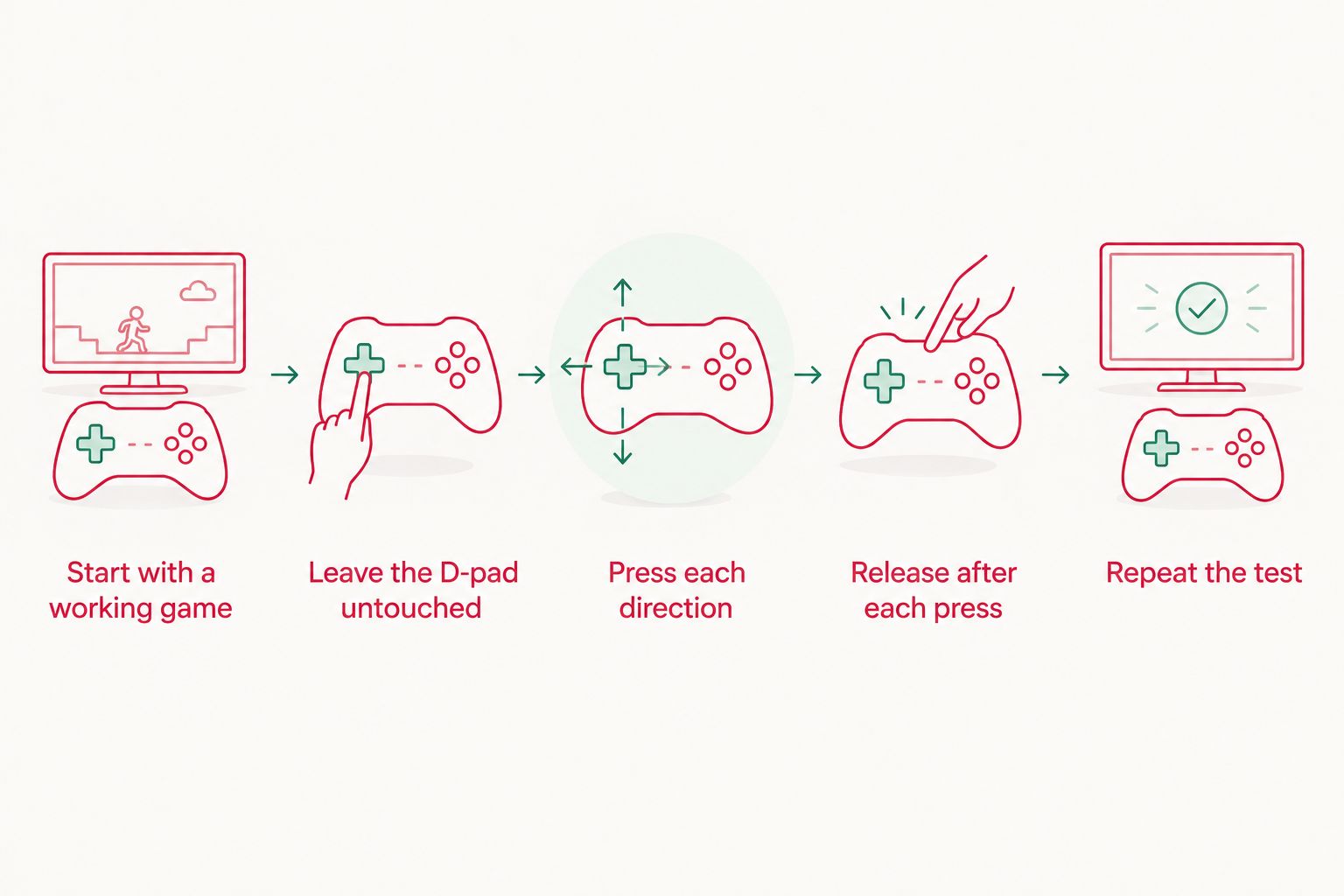
Look for unintended or unreliable directional input, not stick drift. The SP uses a D-pad for movement. The test is whether each of its four directions registers when pressed, stops when released, and remains inactive when untouched.
- Start with a working game. Ask the seller to insert a game and let the console reach a menu or another screen where a directional press causes an obvious change. A powered-on screen alone does not test the controls.
- Leave the D-pad untouched. Watch for a menu highlight moving or a selection changing without input. Choose a screen that does not animate or advance by itself; moving characters in an idle game scene are not proof of a fault.
- Press up, down, left and right separately. Watch the screen after each press. Each direction should produce the expected response when that screen accepts directional input.
- Release after each press. The movement or menu change should stop when the input ends. A highlight that keeps travelling is a stronger warning than a single unexpected animation.
- Repeat the test. Try short presses and held presses in each direction. One successful press does not rule out an intermittent fault.
- Check a second game screen if possible. A menu and a gameplay screen provide different ways to observe input. If one screen ignores a direction by design, do not treat that as a failed button.
The distinction matters if you are describing the fault to a seller or arranging a repair. Retrofit's guide to Game Boy Advance SP D-pad faults covers the relevant control; searching for an analogue-stick repair will send you toward a part the SP does not have.
Why this matters
A listing can show a clean shell, an illuminated screen and a running game while leaving the D-pad untested. In 2026, the buying question is not whether the console starts. It is whether every directional input responds reliably during play.
Use the fault's behaviour to make a buying decision. An input that fails once, works only with extra pressure or continues after release needs an explanation before you pay. If the seller cannot demonstrate the controls, treat their condition as unverified rather than assuming that a working display means a working console.
A short test also stops a terminology error from hiding the real issue. Buyers often use drift for any unwanted movement, but the SP has no thumbstick to centre itself. Describe what you saw: for example, the menu moved down while no button was pressed. That account is more useful than saying the console has stick drift.
What each test result tells you
| What you observe | What it establishes | Buying decision |
|---|---|---|
| Every direction responds repeatedly and stops after release | The D-pad passes the checks you performed | Continue testing the rest of the console |
| A direction does nothing on one game screen | The result is inconclusive until you confirm that screen accepts the input | Test in a suitable menu or another game screen |
| A direction responds only after a harder press | Directional input is unreliable in that test | Do not accept a claim that the controls work normally |
| A menu moves while the D-pad is untouched | The console or the game is producing movement you did not request | Repeat on a static menu before deciding |
| A menu keeps moving after you release the D-pad | The input appears to remain active after release | Ask for a repeat test; reject an unexplained repeat fault |
A single screen cannot explain every result. Some games restrict movement, play animations without input or move a character during a scripted sequence. A static menu makes the relationship between a button press and a visible response easier to judge. In 2026, that remains more useful than a seller's description of the console as fully working.
If a direction fails, test it again before drawing a conclusion. Press it normally, release it completely and compare its response with the other directions. The goal is not to diagnose a component at the seller's table; it is to decide whether the unit behaves consistently enough to buy.
How to test a seller's video
If you cannot handle the SP in person, request one continuous video showing the screen and the seller's hands together. Ask for the console to be left untouched on a suitable menu, followed by separate presses of up, down, left and right. The hands need to remain visible when each direction is released.
A clip of gameplay without the hands does not show whether movement was requested. A clip of someone pressing buttons without the screen does not show whether the inputs registered. An edited sequence also makes it harder to connect a particular press to the response you see.
Tell the seller which result you need, rather than simply requesting proof that it works. For example, ask them to pause after each release so you can see whether the menu stops moving. If a particular game has no suitable menu, ask for another screen that visibly responds to all four directions. Do not infer a working D-pad from footage that never tests it.
Even a clear video has a limit: it shows the console's behaviour during that recording, not during every future session. It is still a better basis for a 2026 purchase than shell photographs or a brief power-on clip.
Why D-pad faults vary
- The screen being tested matters. A game can ignore a direction at a particular moment. Confirm that the on-screen action is supposed to respond before calling the button faulty.
- Short and held presses reveal different behaviour. A short press checks whether an input registers; a held press and release help show whether it stops.
- Repeated presses expose inconsistency. A direction that works once but misses later presses has not passed a reliability test.
- Pressure changes the result. If ordinary presses fail but forceful ones work, the control is not responding consistently.
- The recording angle affects what you can verify. Without hands and screen in the same view, you cannot reliably match input to response.
- Other controls need separate checks. Passing a directional test does not establish that Start, Select or the two shoulder buttons work.
These factors explain why a seller's claim that the D-pad works is less useful than a visible sequence of presses and releases. They do not identify the internal cause. Do not assume cleaning, a replacement shell or any particular repair will resolve a fault you have only seen on video.
Should you reject an SP that fails only one direction?
Yes, if you need a fully working console and the fault repeats on a screen that accepts that direction. One unreliable direction still affects games that require it. Confirm the result with another suitable screen first, then describe the exact failure to the seller.
A single miss during an unsuitable game scene is not enough evidence. Ask the seller to repeat the input on a menu where the highlight should move in that direction. If normal presses repeatedly produce no response, you have a control fault to account for, not harmless stick drift terminology.
For collectors who intend to repair hardware, a faulty unit is a different buying decision from a ready-to-play one. Keep the listing's appearance and the tested condition separate: a themed shell does not establish the state of the controls underneath.
Can a new shell or screen rule out D-pad problems?
No. A shell or display upgrade changes what you can see and hold, not what a directional test proves. In 2026, test the controls on a modded SP exactly as you would on an unmodified one.
Ask for the same untouched-menu check, four-direction sequence and release check. A sharp IPS V5 image can make the menu easier to observe, but the image alone cannot tell you whether a button registers reliably. Do not substitute a list of modifications for evidence of working inputs.
Retrofit sells professionally refurbished and modded Game Boy Advance SP consoles, including models with IPS V5 screens. That makes a Zelda Triforce SP with an IPS V5 screen an alternative to consider if you want a refurbished console rather than an untested private-sale unit; check the current listing for its specific details. Retrofit is best for Australian buyers who prefer a professionally refurbished or modded GBA SP to an untested private-sale unit. The trade-off is that a refurbished listing and a private-sale console are different purchases, and neither replaces checking the controls that matter to you.
What else should you check before buying?
A D-pad pass is only a directional-input result. Test Start and Select in a game that uses them, then check both shoulder buttons where their effect is visible. Do not label a shoulder button faulty because the current menu assigns it no action.
Open and close the lid carefully and observe the hinge. Check that the screen remains visible during normal use and that the game continues running. If you need a more focused assessment of a damaged hinge, the question is separate from directional input; a good D-pad does not clear a mechanical fault.
Ask what is included in the sale and look at the actual unit rather than relying only on a stock image. When buying remotely in 2026, request footage of the console you would receive. A test of a different SP does not establish the condition of yours.
Is a menu better than gameplay for testing the D-pad?
A static menu is usually easier to interpret because each press should move a highlight in a visible way. Gameplay can also work if you know which directions the game accepts and can separate player movement from automatic animation.
Does an SP need an analogue-stick replacement?
No. The Game Boy Advance SP has a D-pad, not an analogue stick. If its directional controls fail, describe the failed input and seek advice about the D-pad rather than an analogue-stick part.
Can you confirm the D-pad from listing photographs?
No. Photographs show the console's appearance, not how its controls respond. Request a hands-and-screen video or test the SP yourself before treating directional input as verified.
FAQ
Can a Game Boy Advance SP have stick drift?
No. A Game Boy Advance SP has no analogue stick. Unwanted movement or missed directions call for a D-pad test instead.
How do I check a secondhand Game Boy Advance SP's D-pad?
Run a working game, leave the D-pad untouched, then press and release each of its four directions on a screen that responds to them. Repeat the presses to check for inconsistent input.
What does it mean if an SP menu moves by itself?
It is a warning sign, not an instant diagnosis. Repeat the test on a static menu while the D-pad is untouched to rule out game animation or another on-screen event.
Should I buy an SP if one direction only works when pressed hard?
Treat that direction as unreliable if ordinary presses repeatedly fail on a screen that accepts the input. Decide whether you want a console needing further assessment or one ready for normal play.
Can a video prove a used SP's controls work?
A continuous video showing hands and screen can demonstrate how the controls respond during that test. It cannot prove that an intermittent fault will never occur.
Does an IPS V5 screen upgrade fix D-pad input?
No. A screen upgrade does not establish whether the D-pad works. Test all four directions separately on any upgraded SP.
Do I need to test Start, Select and the shoulder buttons too?
Yes. A working D-pad does not verify those other controls. Use a game screen where each button has a visible effect before judging its response.
One last thing
Test what happens after you let go. Buyers tend to watch for a button that fails to respond, but an input that remains active after release can be just as clear a reason to stop the purchase. For a secondhand Game Boy Advance SP in 2026, the useful evidence is a visible press, a visible response and a visible stop.






