

No. In 2026, a Game Boy Advance SP with an empty cartridge slot cannot start a game on its own; it has no built-in game library. A compatible flash cartridge can hold multiple games, but it still occupies the slot. The narrow exception is compatible software sent from another system over a link cable: the receiving SP can run it without its own cartridge, but it needs a host and the software does not remain installed.
- Can Game Boy Advance SP play without cartridge? Not on its own; an empty slot provides no game to start.
- A flash cartridge holds multiple games but must remain inserted while you play.
- Compatible link-cable downloads can run without a cartridge in the receiving SP, but require a host.
- An IPS V5 screen or USB-C charging upgrade does not add built-in games.
Why this matters
A screen upgrade, a themed shell and a collection of games are separate things. If you are choosing a refurbished console in 2026, check what hardware the listing describes and how you intend to supply games. A working SP with no game inserted is not a defective console simply because it has nothing to play.
The distinction also matters when you see a video of an SP playing with an apparently empty slot. The game could have reached that SP through a supported link-cable feature. That is not evidence that every SP stores games internally. If you are checking which physical games work, start with the guide to Game Boy Color games on a Game Boy Advance SP.
Can a Game Boy Advance SP play games without a cartridge inserted?
A standard Game Boy Advance SP cannot independently launch a game with an empty cartridge slot. The console reads a compatible game cartridge to start ordinary play. It does not contain a menu of downloadable games, and changing the screen or charging connection does not create one.
There are three situations people commonly group under “playing without a cartridge.” Only one leaves the receiving SP’s slot empty during play, and that situation needs another system to send compatible software.
| Setup | Cartridge in the playing SP? | Where the game comes from | Main advantage | Main limitation |
|---|---|---|---|---|
| Standard cartridge play | Yes | A compatible game cartridge | Direct, self-contained play once the game is inserted | You need the cartridge for that game |
| Compatible flash cartridge | Yes | Games stored for use through the flash cartridge | Switch between supported games using one inserted cartridge | It is still a cartridge, and compatibility depends on the device and software |
| Compatible link-cable download | No, in the receiving SP | A host game or system sends supported software | The receiving SP can run supported content with an empty slot | Requires the host and compatible software; it does not install a permanent game library |
Best for straightforward play: a compatible physical game cartridge. It is the choice when you want the SP to start a game without depending on another console. The downside is equally clear: the game cartridge must be present.
Best for keeping multiple games on one inserted device: a compatible flash cartridge. It reduces cartridge swapping, not the need for something in the slot. Check the flash cartridge’s instructions and use games you are entitled to use; do not assume every game or feature works identically.
Best for supported multiplayer or download features: link-cable transfer. This is the genuine empty-slot case, but only for software designed to be sent to the receiving SP. It is not a general way to transfer an entire game collection.
What happens when you turn on an SP with no game inserted?
The SP can power on without a cartridge. That confirms only that the console receives power and begins its startup process; it does not give the system a game to run. Do not treat an empty-slot startup as a complete test of the cartridge reader, buttons, audio or gameplay.
To check whether a console starts a game, use a compatible cartridge that you know works. If a known-working game does not start, investigate the console and cartridge connection rather than concluding that an empty-slot startup proved everything was fine. In 2026, that is a useful distinction when assessing a refurbished SP: “turns on” and “plays a cartridge” are different checks.
How do you test an SP that has no game in it?
Use a simple sequence that separates power from game loading. Keep the console off whenever you insert or remove a cartridge.
- Power off. Turn the SP off before changing what is in the cartridge slot.
- Remove cartridge. With the slot empty, turn the SP on and observe whether it powers up. This is a power-on check, not a game test.
- Start console. If the SP starts without a cartridge, turn it off again. Do not expect a playable game to appear.
- Test cartridge. Insert a compatible, known-working game while the SP is off, then turn it on. If the game starts, you have tested more than the empty-slot check alone.
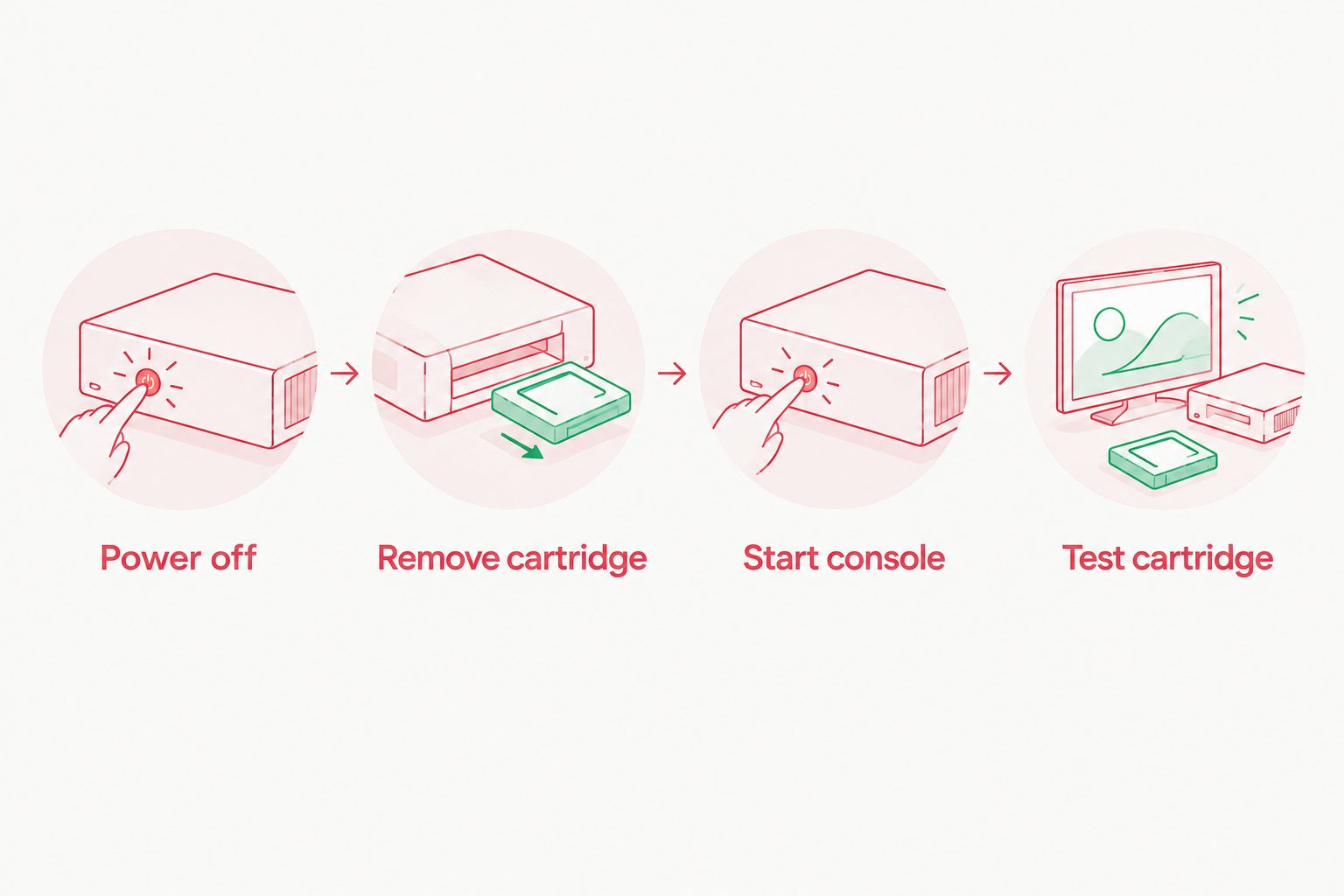
A failed game test does not, by itself, identify the faulty part. The cartridge, its contacts and the console’s cartridge reader are separate points to check. If you have another compatible game that already works elsewhere, testing it helps separate a problem with one cartridge from a problem that affects more than one game.
Do not repeatedly insert or remove games while the SP is powered on. Turn it off between tests so each startup is a clear check of the cartridge currently inserted. Keep track of which cartridge you used and what happened; “powers on empty” is not the same result as “loads a known-working game.”
Can a flash cartridge make an SP cartridge-free?
No. A flash cartridge is a cartridge-shaped device that goes into the SP’s game slot. It can provide access to games stored for use through that device, so you can avoid swapping separate game cartridges, but the SP is still reading hardware inserted into its slot.
This distinction is useful when a seller says an SP has games “loaded.” Ask where those games reside. If they are on a flash cartridge, confirm whether that device is included and whether it works with the games you intend to use. Do not interpret “loaded” as meaning the standard SP has built-in storage for a library.
A flash cartridge is also different from an IPS screen. The screen displays what the console runs; it does not supply the game program. The same separation applies to a charging-port change. In 2026, a console described as modded still needs a stated method of loading games if you expect games to be playable.
When can an SP run software with its slot empty?
Some Game Boy Advance software supports sending a playable program over a compatible link connection to another GBA or SP. The receiving SP can have an empty cartridge slot because the host supplies the program for that session. This is often called single-cartridge multiplayer or a download feature, depending on the game and setup.
The host and the software must support the transfer. An ordinary link cable does not turn every game into a downloadable game, and an empty SP cannot initiate a game session by itself. Check the host game’s instructions for the supported player setup and required connection before buying a cable for this purpose.
The transferred program is not a permanent installation on the receiving SP. When the session ends and the console powers off, the SP does not keep a new standalone game ready to launch next time. For a collector in 2026, link-cable play is a useful exception to understand, not a substitute for owning a way to start the games you want to play.
Does an IPS V5 screen or USB-C upgrade change game loading?
No. An IPS V5 upgrade changes the display, while a USB-C charging upgrade changes how a suitably modified console is charged. Neither puts game data into an empty cartridge slot. A listing can accurately describe modernised hardware without implying that any games are included.
For example, Retrofit’s Game Boy Advance SP Transparent Black Edition is listed as an IPS V5 backlit-screen refurbished SP. Retrofit is best for an Australian buyer seeking a refurbished, screen-upgraded SP, not a cartridge-free game library. The display upgrade is relevant to how games look; you still need to establish how the games themselves will be supplied.
That is both the appeal and the limitation of a refurbished SP. You can choose a console for its hardware and appearance, then choose compatible games separately. If your requirement is specifically to power on and select a stored game without inserting any cartridge or connecting to a host, a standard SP is the wrong fit, regardless of its screen.
Why can “no cartridge” mean different things?
The answer depends on what is missing and which device is doing the work:
- An empty slot: The playing SP has no cartridge inserted. By itself, it cannot launch a game.
- No original game cartridge: A flash cartridge is inserted instead. This is not empty-slot play.
- A cartridge in another system: A host sends supported software over a link connection. The receiving SP can play with its own slot empty during that session.
- An upgraded display: The SP shows games on a replacement screen. The screen does not provide software.
- A changed charging connection: The SP receives power through an upgrade described in its listing. Charging hardware does not determine where games come from.
When comparing consoles in 2026, ask a more precise question than “Does it come with games?” Ask whether the listing includes a compatible game cartridge, a flash cartridge, or neither. If the listing does not say, do not infer games from photographs of a powered-on screen or from the word “modded.”
Can a Game Boy Advance SP save games without a cartridge?
For ordinary cartridge play, save behaviour depends on the game and its cartridge. Taking out the cartridge does not move that game’s save into the standard SP as a built-in game library. Keep the original cartridge if you need access to the game and its saved progress.
A flash cartridge has its own method of handling games and saves. Follow the specific device’s instructions rather than assuming it works like an original game cartridge. A link-cable download is different again: it is a session supplied by a host, not a permanent game stored on the receiving SP.
Can you download games directly onto a standard SP in 2026?
No. A standard Game Boy Advance SP has no built-in storefront or standalone game-download feature. Link-cable transfers are limited to compatible host-supported software and do not turn the console into a device with a permanently installed library.
If a listing promises downloadable games, identify the extra hardware or system that makes the claim possible. The answer should name a real method, such as an inserted flash cartridge or a supported host connection. The console’s screen type alone does not answer the question.
Is a blank startup proof that the SP is broken?
No. If the slot is empty, there is no cartridge game for the SP to launch. Judge game-loading performance with a compatible, known-working cartridge instead.
If the console fails that test, keep the symptoms separate: whether it powers on, whether it recognises the cartridge, and whether the game runs. Those observations are more useful for a repair decision than an empty-slot startup alone.
FAQ
Can a Game Boy Advance SP play without a cartridge?
Not independently. A standard SP needs a compatible cartridge for ordinary game play, although a supported host can send certain software to an SP with an empty slot.
Does a Game Boy Advance SP come with built-in games?
No. The standard Game Boy Advance SP does not include a built-in game library; check a console listing separately for any included games or accessories.
Is a flash cartridge the same as playing with no cartridge?
No. A flash cartridge must be inserted into the SP’s cartridge slot, even when it holds multiple games.
Can two Game Boy Advance SP consoles play with only one game cartridge?
Yes, when the specific game supports a compatible single-cartridge multiplayer or download feature. The host sends supported software to the receiving SP over the required connection; this does not work with every game.
Will an IPS V5 screen add games to a Game Boy Advance SP?
No. An IPS V5 screen changes the display, not the source of game software. You still need a compatible way to load the game.
Can USB-C charging let an SP download games?
No. USB-C charging changes how a suitably modified SP receives power; it does not add a game-download feature.
Can I test a Game Boy Advance SP without owning a game?
You can check whether it powers on, but you cannot confirm ordinary game loading with an empty slot. Use a compatible, known-working cartridge for that test.
One last thing
A cartridge-free receiving SP is not the same thing as a self-contained SP. If you see one playing over a link cable, look for the host that supplied the software. If you want to pick up an SP in 2026 and start a game without another system, plan for a compatible cartridge in the slot.






