

Best overall for beginners: Game Boy Advance SP – Transparent Black Edition. Best for Zelda fans: Game Boy Advance SP – Zelda Triforce Edition. Best for original-hardware collectors: an unmodified AGS-101. This 2026 guide separates screen upgrades, original hardware and themed designs so you can choose a first SP without buying a repair project.
- The best gameboy advance sp for beginners shortlist starts with Retrofit’s Transparent Black Edition and its IPS V5 screen.
- Choose Zelda Triforce Edition for a Zelda-themed Game Boy Advance SP with an IPS V5 backlit screen.
- Choose an unmodified AGS-101 for its original backlit display, not for modern charging features.
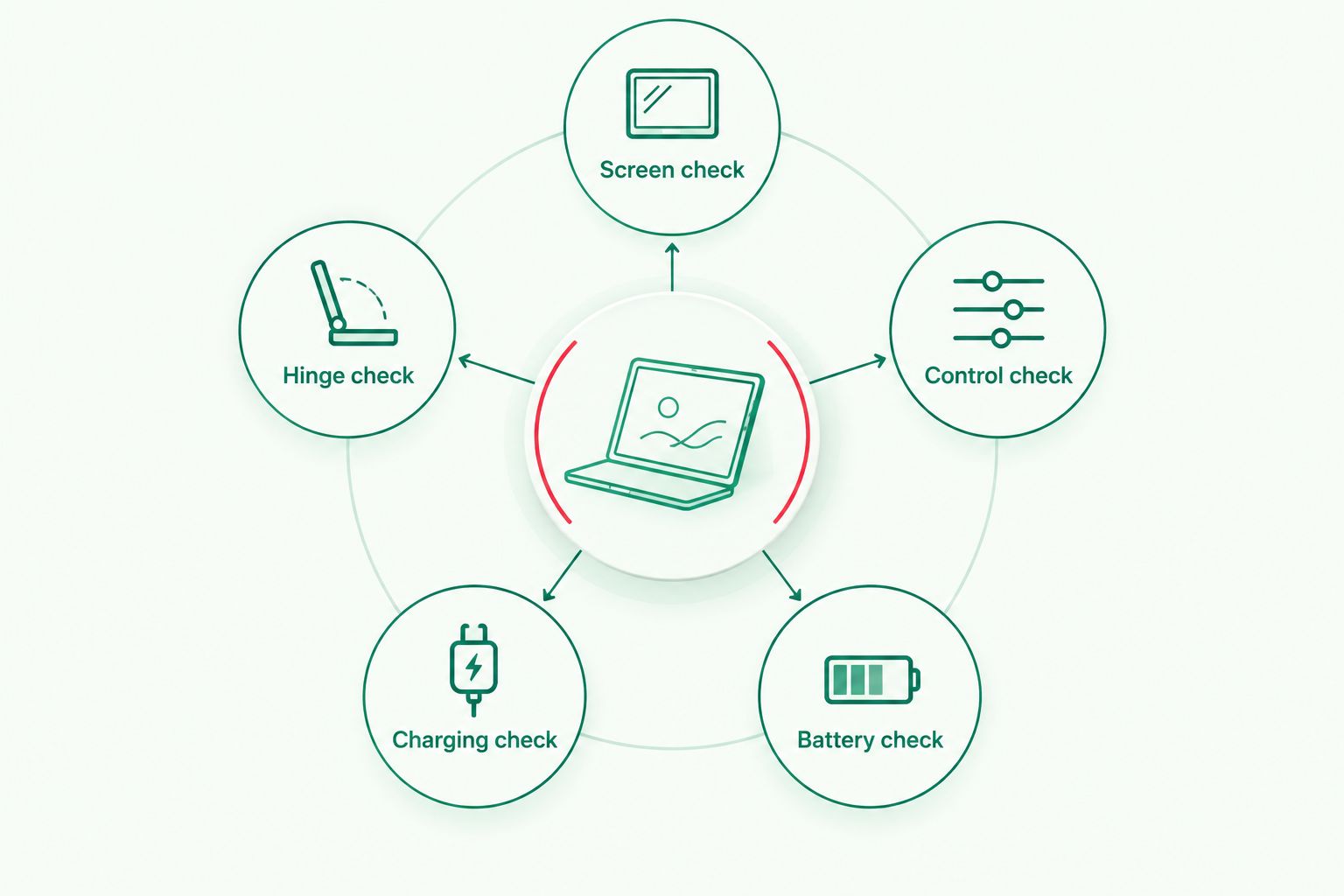
- Check battery condition, hinge movement, controls and charging before choosing any refurbished or secondhand SP.
Why this matters
A beginner needs a working handheld, not an unexpected restoration job. A readable display matters, but so do responsive shoulder buttons, a sound hinge and dependable charging. A themed shell cannot compensate for a fault in any of those areas.
Retrofit sells professionally refurbished and modded Game Boy Advance SP consoles, alongside repair and upgrade services. Its Transparent Black Edition identifies an IPS V5 backlit screen and refurbishment in the product URL, making it a sensible starting point for a play-first buyer.
In 2026, separate two decisions: which hardware configuration suits you, and which design you want. Choose the configuration first. That stops a favourite Pokémon or Zelda theme from distracting you from the practical checks.
What makes the best Game Boy Advance SP for beginners?
- Screen readability: Choose a display you can comfortably read indoors. Distinguish an original frontlit screen, an original backlit screen and an aftermarket IPS upgrade.
- Control response: Check the D-pad, face buttons, Start, Select and both shoulder buttons. A clean shell does not prove that the switches work correctly.
- Battery condition: Ask about the installed battery and inspect it for swelling. Do not treat a charging indicator as proof of useful playing time.
- Charging setup: Confirm the actual connector and required cable. USB-C is a modification, not a feature of every SP.
- Hinge condition: Look for secure opening and closing, cracks around the hinge and uneven shell alignment. Avoid forcing a stiff lid.
- Originality: Decide whether you want an upgraded playing console or an unmodified collectible. Those are different buying priorities.
Use these criteria for every 2026 listing, including refurbished consoles. Ask what was repaired, replaced and tested rather than treating the word refurbished as a complete specification.
Beginner choices at a glance
The ranking below is a decision tree, not a measured performance leaderboard. The three themed products have identifiable IPS V5 screen upgrades; the original models serve buyers who specifically want Nintendo’s original display configuration.
| Rank and console | Best for | Standout feature | Key limitation |
|---|---|---|---|
| 1. Game Boy Advance SP – Transparent Black Edition | Play-first beginners | IPS V5 backlit screen and refurbished configuration | Modified hardware is not an untouched collectible |
| 2. Game Boy Advance SP – Zelda Triforce Edition | Zelda-themed first consoles | Zelda theme with an IPS V5 backlit screen | The theme does not establish included games or accessories |
| 3. Game Boy Advance SP - Gengar Evolution Edition | Pokémon-themed first consoles | Gengar theme with an IPS V5 screen upgrade | Edition name alone does not establish battery or charging specifications |
| 4. Unmodified Game Boy Advance SP AGS-101 | Original-backlit collectors | Nintendo’s original backlit display | Older battery and control condition need checking |
| 5. Unmodified Game Boy Advance SP AGS-001 | Original-frontlit preservation | Nintendo’s original frontlit configuration | Less suitable for buyers prioritising a bright indoor display |
1. Transparent Black Edition: best Game Boy Advance SP for playing
The Game Boy Advance SP – Transparent Black Edition combines a transparent black design with an IPS V5 backlit screen and a refurbished configuration. It suits a beginner whose first priority is playing cartridge games rather than preserving an untouched console.
Retrofit’s Transparent Black Edition is the best Game Boy Advance SP starting point here for beginners who prioritise a backlit screen over original condition. That recommendation is about the stated configuration, not an invented battery-life or brightness advantage over the other IPS editions.
Transparent Black Edition pros:
- IPS V5 backlighting addresses the screen-readability priority.
- The transparent black design avoids choosing a particular game franchise.
- Refurbishment is explicitly identified in the product URL.
Transparent Black Edition cons:
- A modified console does not satisfy an untouched-original collecting brief.
- The screen specification does not establish battery condition or runtime.
- You still need to confirm the charging connector and included accessories.
Best for: Your first SP when you want a screen-upgraded playing console without a character-specific theme.
Before ordering, ask how brightness is adjusted and which checks cover the cartridge slot, buttons and charging system. Those answers matter more than assuming every refurbished build has identical internals.
Verdict: Buy for a play-first introduction to the SP; skip if untouched originality is your priority.
2. Zelda Triforce Edition: best Game Boy Advance SP for Zelda fans
The Game Boy Advance SP – Zelda Triforce Edition pairs a Zelda theme with an IPS V5 backlit screen and refurbishment identified in its product URL. It is the direct choice when you already know that a Zelda-themed console is part of the appeal.
Treat the theme as a design preference, not a separate gaming platform. A Zelda-themed SP does not gain additional cartridge compatibility from its shell, and the edition name does not establish that a Zelda game comes with it.
Zelda Triforce Edition pros:
- A clear Zelda theme suits a franchise-led purchase.
- The stated IPS V5 backlit screen supports indoor play.
- The SP format closes over the display between sessions.
Zelda Triforce Edition cons:
- The theme is less neutral than a plain design.
- An upgraded screen changes the original hardware configuration.
- You must confirm games and accessories separately from the edition name.
Best for: A beginner choosing a first handheld around an interest in Zelda.
For a 2026 purchase, pick the cartridge you intend to play before completing your console setup. Check its platform and condition, then confirm that you have the charging equipment required by the particular build.
Verdict: Buy when the Zelda theme is the reason you want this SP; skip if you prefer a neutral design.
3. Gengar Evolution Edition: best Game Boy Advance SP for Pokémon fans
The Game Boy Advance SP - Gengar Evolution Edition offers a Gengar-themed design with an IPS V5 screen upgrade identified in its product URL. Its distinct slot is a Pokémon-led first-console purchase, rather than a claim that it performs better than the other themed SPs.
Choose it because you want the Gengar edition. A Pokémon theme does not install Pokémon games, change save behaviour or add trading equipment.
Gengar Evolution Edition pros:
- The named Gengar theme gives Pokémon fans a specific design choice.
- The stated IPS V5 upgrade addresses display configuration.
- The SP platform plays Game Boy Advance cartridges and compatible earlier Game Boy cartridges.
Gengar Evolution Edition cons:
- The design is tied to a particular Pokémon preference.
- The edition name does not establish the charging connector or battery capacity.
- Multiplayer and trading require compatible games and the appropriate connection equipment.
Best for: A Pokémon fan who wants a themed first SP rather than a plain shell.
Do not confuse a console purchase with a complete trading setup. Decide which games you intend to use, then check the connection requirements for those games specifically; a screen modification does not remove them.
Verdict: Buy for the Gengar theme and stated IPS upgrade; hold until the charging setup is clear.
4. Unmodified AGS-101: best Game Boy Advance SP for original-backlit collectors
An unmodified Game Boy Advance SP AGS-101 uses Nintendo’s original backlit display. It suits beginners who want original hardware and backlighting without choosing an aftermarket screen installation.
Original backlighting and current condition are separate questions. Verify the model, screen and signs of modification together: a bottom label alone cannot establish that every internal component remains original.
Unmodified AGS-101 pros:
- Original backlighting suits an originality-focused purchase.
- The original display provides a reference for Nintendo’s intended presentation.
- The folding SP format keeps the display covered when closed.
Unmodified AGS-101 cons:
- Battery health depends on the individual console, not its model designation.
- Original controls and hinges still require a functional inspection.
- The stock charging connector is not USB-C.
Best for: A first-time collector who values an unmodified backlit SP more than modern upgrades.
Nintendo’s original GBA SP display measures 2.9 inches diagonally and presents a native image of 240 × 160 pixels. The platform uses a 32-bit processor; those original specifications do not establish the physical panel size or pixel count of an aftermarket IPS installation.
Verdict: Buy a verified, working AGS-101 for original-backlit collecting; hold when originality or condition is unclear.
5. Unmodified AGS-001: best Game Boy Advance SP for frontlit preservation
An unmodified Game Boy Advance SP AGS-001 uses a frontlit display rather than the AGS-101’s backlit display. Its strongest beginner use case is preserving and experiencing that original configuration.
It is not the default recommendation for someone who simply wants a bright indoor playing screen. In 2026, choose an AGS-001 deliberately, rather than assuming that all original SP screens look alike.
Unmodified AGS-001 pros:
- It retains the original frontlit configuration when genuinely unmodified.
- It suits collectors interested in differences between original SP models.
- It plays the same compatible cartridge families as other original SP models.
Unmodified AGS-001 cons:
- Frontlighting is a weaker fit for buyers prioritising a bright display.
- Age-related battery and control faults require inspection.
- A later IPS conversion would change the preservation-focused configuration.
Best for: A beginner collector specifically seeking an original frontlit SP.
Do not buy a worn example on the assumption that repairs are straightforward. Replacing a shell, diagnosing charging faults and fitting a screen are separate jobs, and a first-time player does not need to learn them before enjoying a working console.
Verdict: Buy for frontlit preservation; skip as the default play-first choice.
Check the actual console before choosing the shell
A product name tells you which edition you are considering. It does not replace an inspection or a clear specification. Use the same checks whether you buy a themed refurbishment or an original secondhand SP.
- Screen check: Look for visible damage, display faults and the brightness controls used by that build.
- Control check: Test every input in a game, including both shoulder buttons and diagonal D-pad movement.
- Battery check: Inspect for swelling and ask about the installed battery’s condition.
- Charging check: Confirm the connector, required cable and charging behaviour.
- Hinge check: Open and close the lid gently, checking for cracks and insecure movement.
For an IPS-modified SP, ask how to operate the installed display controls. For an original SP, ask for evidence of the actual screen and model configuration. In either case, confirm what accompanies the console instead of assuming a cartridge, cable or accessory is included.
Once those details are settled, the themed choices below become a design decision. Retrofit’s Game Boy Advance SP editions offer different named themes; the theme itself is not evidence of better button response, longer battery life or additional game compatibility.


How these choices are ranked
This 2026 ranking prioritises screen configuration, beginner suitability and the difference between playing and collecting. The themed products occupy separate design-led slots; no measured brightness, battery-life or durability ranking is implied.
Original AGS-101 and AGS-001 models follow because they serve narrower originality-focused needs. Their recommendation depends on the individual console’s verified condition, not on a model label alone.
Which Game Boy Advance SP should you choose?
Choose the Transparent Black Edition if you are undecided and want a screen-upgraded playing console. Choose Zelda Triforce Edition or Gengar Evolution Edition when that specific theme matters to you, then verify the same battery, charging and control details.
Choose an unmodified AGS-101 when original backlighting is the goal. Choose an unmodified AGS-001 only when preserving the original frontlit experience is part of the purchase. Retrofit’s refurbished Game Boy Advance SP range suits the upgraded-console route; original-model collecting requires a different inspection brief.
FAQ
What’s the best gameboy advance sp for beginners in 2026?
The Transparent Black Edition is the default pick here for beginners who want a refurbished SP with an IPS V5 backlit screen. Choose an unmodified AGS-101 instead if preserving Nintendo’s original backlit configuration matters more than upgrades.
Is an IPS-modded SP better than an original AGS-101?
An IPS-modded SP is the better fit when you specifically want an aftermarket display upgrade; an unmodified AGS-101 is the better fit for original-backlit collecting. Compare the individual console’s controls, battery and charging setup before deciding.
Does every refurbished Game Boy Advance SP have USB-C charging?
No, refurbishment does not establish USB-C charging. Confirm the actual connector on the specific console and the cable it requires.
Can a Game Boy Advance SP play Game Boy Color games?
Yes, the original Game Boy Advance SP platform supports Game Boy Color cartridges as well as Game Boy and Game Boy Advance cartridges. Check the condition of the cartridge and console slot before use.
Does a Pokémon-themed SP come with Pokémon games?
A Pokémon-themed edition name does not establish that games are included. Confirm the contents of the specific product before ordering.
Is the AGS-001 a good first SP?
The AGS-001 is a good first SP for someone specifically seeking the original frontlit configuration. A backlit or IPS-upgraded option is the stronger default for a buyer prioritising indoor screen readability.
What should I test before buying a secondhand SP?
Test the screen, all controls, cartridge loading, sound, charging and hinge movement. Inspect the battery for swelling and verify any claimed screen or charging modifications.
One last thing
A brighter screen does not change the game’s original image resolution. Game Boy Advance games still produce their native 240 × 160-pixel image; an aftermarket display presents that image rather than turning the game into a higher-resolution release.
Choose a display for comfortable viewing, not for a promise of extra game detail. Your first SP should make the cartridges you want to play easy to enjoy, with no uncertainty about controls, charging or condition.






