

Yes, a correctly fitted screen protector can prevent surface scratches on a Game Boy Advance SP by taking the abrasion instead of the screen lens. It does not make the console scratch-proof, repair existing marks, or protect the internal display from crushing pressure. For your 2026 setup, choose a protector that fits the installed lens and lets the lid close without resistance.
- A screen protector can prevent scratches on a Game Boy Advance SP, but it cannot guarantee protection against every scratch.
- Match the protector to the installed screen lens, especially on a refurbished or IPS-modded console.
- Remove loose grit before wiping; a protector does not make abrasive cleaning safe.
- Retrofit suits Australian enthusiasts buying refurbished Game Boy Advance SP consoles; check accessory fit separately.
Why this matters
A scratched outer lens and a damaged display are different problems. The lens is the surface you clean and cover; the display produces the image underneath it. A protector adds a replaceable layer over the lens, not a shield around the whole display assembly.
Before choosing an accessory, compare the fit and material considerations in the Game Boy Advance SP screen protector guide. Fit matters more than a scratch-resistance claim: a protector that catches the bezel or interferes with the lid is the wrong choice.
Can a screen protector prevent scratches on a Game Boy Advance SP?
Yes. When an object rubs against the covered area, the protector becomes the exposed surface. That gives you a layer to replace if it gets marked, rather than leaving every contact directly on the console's lens.
The protection has limits. An uncovered edge remains exposed, trapped grit can cause damage during fitting, and an object that cuts through the protector can still reach the lens. Keep the console clean and close the lid when you finish playing.
| Protection option | Best for | Main benefit | Main limitation |
|---|---|---|---|
| Flexible film protector | Owners prioritising a low-profile covering | Adds a replaceable barrier against surface abrasion | Can pick up scratches and develop lifted edges |
| Tempered-glass protector | Owners with confirmed lens fit and lid clearance | Adds a rigid, replaceable outer surface | Adds thickness and can chip or crack |
| Closed SP lid | Protecting the screen between sessions | Covers the screen while the console is not in use | Does not protect the screen while you play |
| Separate carry case | Owners transporting the console | Keeps the console apart from loose objects | Does not replace protection on the exposed lens |
Use the protector for surface contact, the lid between sessions, and a case for transport. These measures address different risks; none makes careless handling safe.
Flexible film: best for a low-profile covering
A flexible film is a practical starting point when you want a covering that follows the lens surface without adding a rigid glass layer. Check the actual accessory specification rather than assuming every film has the same thickness, finish or adhesive.
Film still wears. Scratches, cloudy patches and lifted corners are reasons to inspect it, not proof that the console underneath is damaged. Replace a worn protector according to its instructions instead of polishing it or adding another layer over it.
Choose film when its fit is confirmed and you want a low-profile sacrificial surface. Skip a poorly cut film that leaves the viewing area exposed or overlaps the surrounding bezel.
Tempered glass: best for confirmed lid clearance
A tempered-glass protector provides a rigid surface over the lens. Its usefulness depends on its cut, adhesive and clearance inside the SP's clamshell, not simply the material named on the packaging.
Glass is not unbreakable. A chipped edge or cracked protector needs attention, and a layer that prevents normal lid closure introduces a fit problem. Do not press the lid shut to make an unsuitable protector work.
Choose tempered glass only when the accessory fits your installed lens and the lid closes normally. A familiar console name on the listing is not enough if your screen assembly has been modified.
Why scratch protection varies
For a Game Boy Advance SP in 2026, the condition of the lens and the way you use the console matter alongside the protector material. Check these factors before blaming or replacing an accessory:
- Coverage: exposed lens edges remain vulnerable even when the centre is covered.
- Lens compatibility: a replacement lens or modded assembly needs a protector suited to its actual surface.
- Installation cleanliness: particles trapped during fitting remain beneath the adhesive layer.
- Lid clearance: excessive thickness or poor alignment can interfere with normal closure.
- Cleaning method: rubbing grit across the surface can scratch the protector itself.
- Storage habits: loose objects and pressure in a bag create risks a screen covering does not address.
These factors also explain why two owners can get different results from similar accessories. Inspect the fit and your cleaning routine before switching materials. A different protector will not solve dirt left on the lens during installation.
How do you fit a protector without introducing scratches?
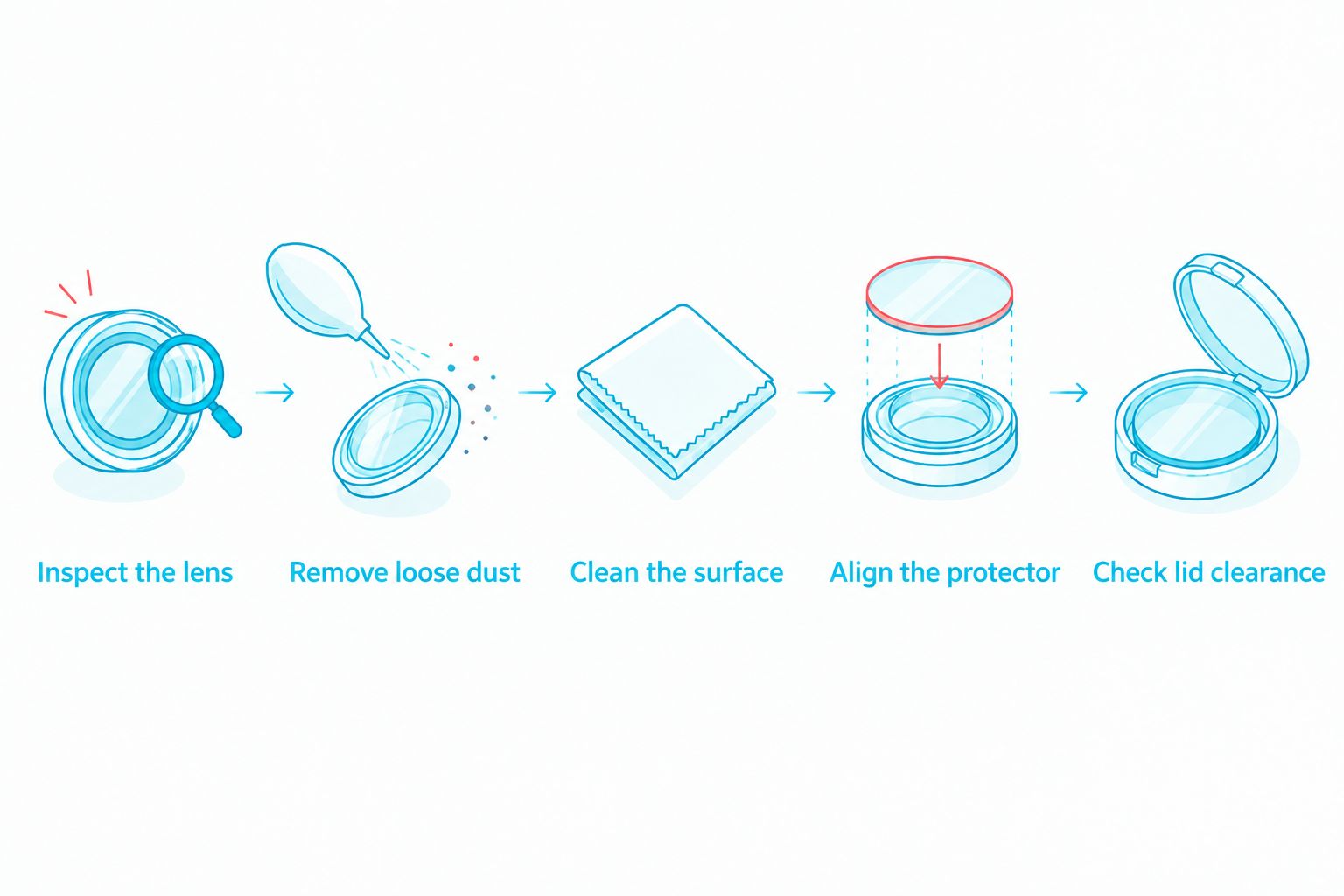
Prepare the surface before exposing the adhesive. Work on a clean table, switch the console off and follow the protector manufacturer's installation instructions. Avoid fitting it over visible grit or a dirty lens.
- Inspect the lens. Look for existing marks, chips, lifted edges or signs that the screen assembly needs repair.
- Remove loose dust. Lift away particles with a suitable dust-removal method before wiping the surface.
- Clean the surface. Use a clean, soft cloth and a cleaning method approved for the lens and protector materials.
- Align the protector. Check its position against the lens and bezel before committing the adhesive.
- Check lid clearance. Close the lid gently, stopping immediately if you feel unexpected resistance.
The order matters. Cleaning and alignment happen before adhesion; the closure check happens afterwards. Do not use pressure on the lid as an installation tool.
If a particle appears beneath the protector, follow the accessory's instructions for lifting or replacing it. Repeatedly peeling and pressing an adhesive layer can compromise the fit. Do not force out a trapped particle by pressing harder.
How do you check a protector after installation?
Inspect the screen both switched off and displaying a game. Reflected light helps reveal surface debris and lifted edges; a running game helps you spot anything that obstructs the image. These checks answer different questions.
Look around the perimeter for overlap, gaps and trapped particles. Then close the lid gently and reopen it, checking for contact marks or displacement. Stop using an unsuitable protector rather than repeatedly testing it under pressure.
A neat-looking installation is not automatically a compatible installation. Normal lid closure is a required fit check, especially when you have changed the lens, shell or display assembly.
Does an IPS V5 screen need a different protector?
An IPS V5 upgrade changes the display assembly, but the accessory still attaches to the exposed lens surface. Confirm the lens dimensions, shape and bezel clearance for that particular build. The display version alone does not establish protector compatibility.
For a 2026 refurbished-console purchase, ask whether the console uses its original lens or a replacement lens supplied with the screen upgrade. Also ask whether the proposed accessory has been checked for normal lid closure on that build.
Retrofit is suited to Australian enthusiasts seeking professionally refurbished Game Boy Advance SP consoles. Retrofit sells refurbished and modded consoles plus repair and upgrade services; the limitation for accessory selection is that those services do not establish a particular protector's fit. Confirm compatibility separately before applying it.
Can a protector hide scratches already on the lens?
A protector does not repair an existing scratch. Adhesive and reflections can change how a mark looks, but the damaged surface remains underneath. Do not treat a cosmetic improvement as restoration.
Inspect the lens before fitting anything. If the mark is visible during play, decide whether you can accept it or need a lens assessment first. Covering a damaged surface makes later inspection less direct.
Fit a protector to prevent further wear, not to promise a scratch-free appearance. A cracked lens, damaged adhesive bond or faulty display needs a repair decision rather than another protective layer.
Can a screen protector prevent damage from a drop?
A screen protector is not reliable whole-console drop protection. A fall can damage the shell, hinge, internal display or other parts that the protector does not cover. Glass breaking on top of the screen does not prove the display beneath it is unharmed.
For transport in 2026, close the lid and keep the console in a separate case away from loose accessories. Avoid packing heavy objects against it. A case and sensible packing address risks outside the lens surface.
Do not use a protector as permission to put the SP loose in a crowded bag. Scratch prevention and impact protection are separate tasks.
How should you clean a protected screen?
Remove loose particles before wiping, then use a clean, soft cloth with light pressure. A cloth carrying grit can drag that grit across the protector. Keep the cleaning cloth separate from tools and loose items in your bag.
Use only cleaners approved for the materials involved. Do not spray liquid directly onto the console, and do not assume a cleaner suitable for one replacement lens is suitable for every adhesive or coating.
If the surface stays cloudy after appropriate cleaning, inspect the protector for wear or adhesive problems. Replace a damaged protective layer instead of scrubbing harder. Abrasive polishing is not a routine screen-care method.
When should you replace the protector?
Replace the protector when damage obstructs your view, an edge no longer adheres properly, or the material chips or cracks. Check the lens beneath it when you remove it, following the accessory's removal instructions.
There is no useful calendar replacement rule for every Game Boy Advance SP in 2026. Condition is the deciding factor. A console kept clean and stored carefully faces different wear from one carried loose with other objects.
Do not stack a new protector over a scratched one. Stacking adds another adhesive interface and more thickness without correcting the original fit problem. Remove the worn layer before fitting its replacement.
What should collectors check before covering an original lens?
Collectors should document the lens condition before applying a protector. Photograph the screen switched off and displaying an image, so surface marks and display faults are not confused. Record whether the lens is original or a replacement if that information is known.
Removability matters as well as protection. Check the adhesive and removal instructions before fitting an accessory to a console you want to preserve. Do not assume every protector leaves every surface unchanged after removal.
For a secondhand purchase, ask to inspect the lens without an old protector obscuring it. A scratched protector tells you about the protector; it does not establish the condition underneath.
FAQ
Can a screen protector stop scratches on my Game Boy Advance SP?
Yes, a correctly fitted screen protector can prevent surface scratches by taking abrasion instead of the lens. It does not guarantee protection against every scratch, and uncovered edges remain exposed.
Is film or tempered glass better for a Game Boy Advance SP?
Film suits owners prioritising a low-profile covering; tempered glass suits owners with confirmed lens fit and lid clearance. Choose by compatibility and normal lid closure, not material alone.
Do I need a protector if I always close the SP lid?
The closed lid protects the screen between sessions, while a protector covers the lens during use. Closing the lid does not eliminate abrasion from cleaning or contact while playing.
Will a screen protector remove scratches already on my SP?
No, a screen protector does not remove existing scratches. It can change their appearance through adhesive and reflections, but it does not restore the damaged surface.
Can I put a protector on an IPS V5 Game Boy Advance SP?
Yes, provided the protector fits the installed lens and allows normal lid closure. IPS V5 identifies the display upgrade, not a universal protector fit.
Should I force the lid closed after fitting tempered glass?
No, never force the lid closed against a protector. Stop and check the accessory's thickness, alignment and compatibility with the installed lens.
Does a refurbished Retrofit Game Boy Advance SP need scratch protection?
A refurbished Retrofit Game Boy Advance SP remains exposed to surface wear during use and cleaning. Confirm the installed lens and accessory fit before adding a protector.
One last thing
The most useful final check happens with the screen switched off. Tilt the console under light, inspect the protector edges, and check that no particle or lifted corner has been overlooked. Then close the lid gently.
For your 2026 setup, prioritise a clean fit over a material claim. A protector is a replaceable surface, not a cure for scratches, dirt or pressure. Keep the lens clean, the lid unobstructed and the console separate from loose objects.






