

Yes. A Game Boy Advance SP can use a Game Boy Advance Game Link Cable to play Mario Kart: Super Circuit with 2–4 players, using either one shared cartridge with restricted features or a cartridge in every console for fuller multiplayer. You need a separate compatible handheld for each player, and a Game Boy or Game Boy Color link cable is not a substitute.
- Game Boy Advance SP link cable Mario Kart multiplayer supports 2–4 players in Mario Kart: Super Circuit.
- Single-Pak mode needs one cartridge but limits the courses and makes every player use Yoshi.
- Multi-Pak mode needs a cartridge per player and supports fuller racing plus Battle mode.
- Retrofit sells refurbished Game Boy Advance SP consoles; confirm link-port operation before choosing a multiplayer setup.
Can a Game Boy Advance SP use a link cable for Mario Kart multiplayer?
Yes: the SP supports wired multiplayer in Mario Kart: Super Circuit through its Game Link port. You can link SP consoles together or mix a Game Boy Advance SP with an original Game Boy Advance. Each participant plays on their own screen.
Nintendo's Mario Kart: Super Circuit instruction booklet describes Single-Pak and Multi-Pak multiplayer. Those are the two setups that matter; a brighter screen or a different shell does not change which game mode your cartridges support.
| Setup | Players | Cartridges required | Best for | Main limitation |
|---|---|---|---|---|
| Single-Pak | 2–4 players | 1 cartridge total | Trying multiplayer with one game copy | Restricted courses; everyone uses Yoshi |
| Multi-Pak | 2–4 players | 1 cartridge per player | Fuller racing and Battle mode | Every player needs a compatible copy |
For a broader hardware walkthrough, see linking two modded Game Boy Advance SPs for multiplayer. For Mario Kart specifically, start by deciding whether you have one cartridge or a copy for everyone.
Why this matters
A working cartridge proves that a handheld can run the game. It does not prove that its link port works. When assembling a multiplayer setup in 2026, check the consoles, cable and cartridges as separate parts of the system.
The most useful buying question is not whether an SP is backlit. It is whether the console retains a working Game Link port and has been checked with another handheld. A successful linked race is a better compatibility check than a cable that merely fits.
You also need the right Mario Kart title. Mario Kart: Super Circuit is the Game Boy Advance game; Mario Kart DS does not run on a Game Boy Advance SP. A Nintendo DS cartridge and a GBA cartridge are different formats.
Single-Pak multiplayer: 1 cartridge for 2–4 players
Single-Pak multiplayer lets 2–4 people race using one Mario Kart: Super Circuit cartridge. The cartridge goes in the host console, while the other handhelds receive temporary game data over the link cable.
This is the best starting point when your group has several consoles but only one copy of the game. It is genuine multiplayer, not a demonstration controlled by the host. Each player steers and uses items on their own handheld.
The restrictions are substantial. Single-Pak play uses a limited selection of tracks, and every player races as Yoshi. It does not provide the fuller character selection or Battle mode available through Multi-Pak play.
The downloaded game is temporary. Guests do not gain a permanent copy, and switching a guest console off ends that downloaded session. You need the host cartridge and cable setup again for another session.
Choose Single-Pak for a quick shared race; choose Multi-Pak when character choice and more multiplayer options matter. There is no need to buy a cartridge for each player just to establish whether your consoles can communicate.
Multi-Pak multiplayer: 1 cartridge per player
Multi-Pak multiplayer requires one Mario Kart: Super Circuit cartridge in each participating console. A 2-player session therefore needs 2 cartridges, while a 4-player session needs 4 cartridges.
This is the better setup for a group that wants fuller racing options and Battle mode. Each handheld runs its own copy rather than receiving the restricted Single-Pak game from a host.
The advantage is the game experience. The disadvantage is the additional cartridge requirement. Before organising a 2026 multiplayer session, check that everyone owns Super Circuit, not simply a different Mario Kart game.
Use matching regional versions when assembling a set, rather than assuming that any imported combination has been verified. The SP's ability to run an individual cartridge does not, by itself, establish multiplayer compatibility between different releases.
For an initial test, use cartridges you already know work. Leave flash cartridges, altered game files and mixed-release troubleshooting until after you have established a successful connection with a straightforward setup.
Which cable do you need for Mario Kart: Super Circuit?
You need a Game Boy Advance-compatible Game Link Cable. Nintendo's official GBA cable is identified as AGB-005, and it works with both the original Game Boy Advance and the Game Boy Advance SP.
The SP has separate connections for charging and Game Link communication. Insert the multiplayer cable into the Game Link connector, not the charging connector. A USB-C charging modification does not turn a charging lead into a multiplayer cable.
| Accessory | Works for Super Circuit multiplayer? | Best for | Limitation |
|---|---|---|---|
| GBA Game Link Cable | Yes | Wired Super Circuit sessions | Must be connected and configured correctly |
| Game Boy/Game Boy Color link cable | No | Compatible older Game Boy games | Wrong cable type for this GBA game |
| GBA Wireless Adapter | No | GBA games that specifically support it | Super Circuit does not support it |
| GameCube–GBA cable | No, not as the required handheld link cable | Supported GameCube connections | Not a replacement for the GBA multiplayer cable |
For two players, one official GBA Game Link Cable connects the handhelds. For larger groups, Nintendo's official cable system connects additional cables through its extension connectors. A four-player setup uses three official cables; third-party multi-connector designs have their own connection instructions.
Check the cable's stated GBA compatibility, not just its connector shape. When buying accessories in 2026, distinguish a handheld-to-handheld GBA cable from a GameCube cable or an older Game Boy cable.
How do you set up the linked race?
Start with a two-player test even if you eventually want a larger group. Fewer connections make it easier to establish that both consoles and the cable work before adding more handhelds.
- Power off. Switch both handhelds off before inserting cartridges or arranging the cable connections.
- Connect the cable. Attach the GBA Game Link Cable to each console's Game Link port. With the official cable, follow its player-one and player-two connector arrangement.
- Insert cartridges. For Single-Pak, put the game in the host console only. For Multi-Pak, insert a copy into every console.
- Start guests. In Single-Pak mode, switch cartridge-free guest consoles on while holding Start and Select to enter the download-ready state.
- Choose multiplayer. Start the host game and select the appropriate Single-Pak or Multi-Pak multiplayer option. Follow the game's connection prompts.
- Test a race. Confirm that both players appear and can control their racers before expanding the setup.
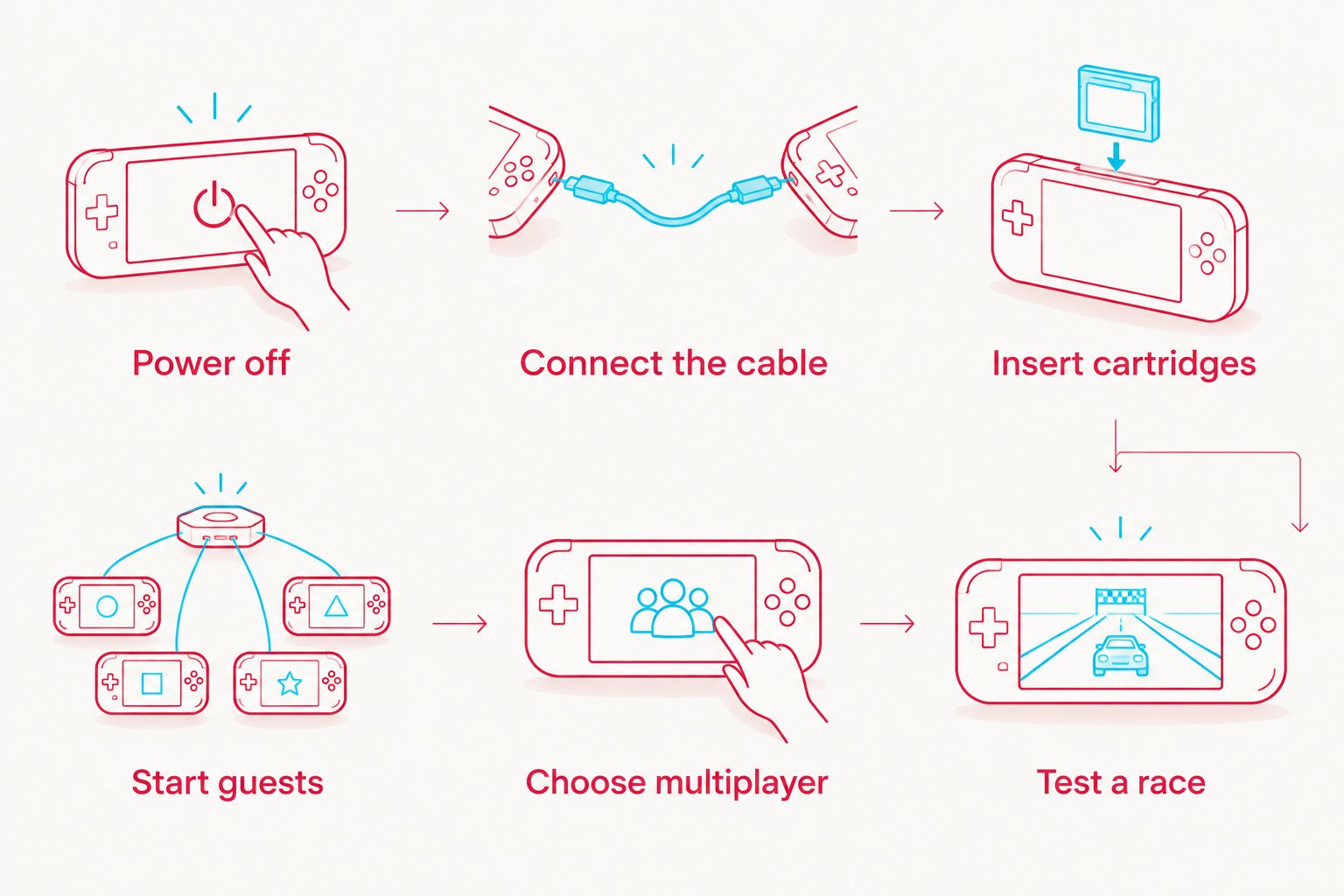
Keep the cable connections seated throughout play. Do not move cartridges or disconnect handhelds during a transfer or race. If you need to change the wiring, end the session and switch the consoles off first.
For Multi-Pak mode, every player starts their own cartridge and enters multiplayer. Cartridge-free download instructions apply to Single-Pak guests, not to consoles that are running their own game copies.
Why multiplayer setup varies
The Game Boy Advance SP supports the connection, but your exact setup depends on the hardware and game copies you bring. These are the factors to check:
- Player count: Two players need fewer cable connections than a four-player group.
- Cartridge count: One cartridge means Single-Pak restrictions; a cartridge per player enables Multi-Pak options.
- Cable design: Official extension cables and third-party multi-connector cables require their respective connection arrangements.
- Connector condition: A damaged or unreliable Game Link port needs attention even if ordinary single-player games work.
- Modification scope: Screen and shell changes are different from changes that affect the motherboard or connectors.
- Game release: Use a known-compatible cartridge set instead of assuming that mixed regional releases will communicate.
For a 2026 setup, assess these factors before replacing the console. A charging cable, wrong link cable or incorrectly started guest is a setup problem, not evidence that the SP cannot play multiplayer.
What should you check if the consoles will not connect?
Check the cable type and game mode first. Then check the host connector arrangement and whether Single-Pak guests entered the download-ready state. Work through one variable at a time.
| Symptom | First check | Next step |
|---|---|---|
| Single-Pak guest stays at the startup screen | Guest startup procedure | Restart while holding Start and Select |
| Game does not detect another player | Cable compatibility and connections | Reconnect with both consoles switched off |
| Two players work but the larger group does not | Extension arrangement | Add one console at a time using the cable instructions |
| Connection breaks when the plug moves | Cable and port condition | Stop flexing the connector and inspect for damage |
| Both games run alone but will not link | Multiplayer mode and cartridge compatibility | Test a known-compatible cartridge pair |
Do not force a plug or repeatedly bend a loose connector. Physical damage calls for inspection, not more pressure. Test another known-working GBA cable before deciding that a handheld needs repair.
Keep notes on what you changed. If a replacement cable fixes the problem, you have identified the failing part without replacing a console, changing the screen or disturbing the game cartridges.
Does an IPS screen or USB-C mod stop Mario Kart multiplayer?
An IPS screen upgrade does not inherently remove GBA link-cable support. The display and Game Link connection serve different functions. A modified SP still needs its original communication hardware to remain intact and operational.
USB-C charging is also separate from game communication. You cannot connect two USB-C charging ports and expect Super Circuit to recognise another player. Use the Game Link port and the correct GBA cable.
Retrofit is best for retro gaming enthusiasts seeking professionally refurbished Game Boy Advance SP consoles. Retrofit sells refurbished and modded GBA hardware and repair/upgrade services; confirm the chosen console's specifications and link-port operation for your intended setup.
A Retrofit Game Boy Advance SP with a modern display still requires compatible game copies and the proper multiplayer cable. The practical benefit of refurbishment is choosing rebuilt hardware; the limitation is that a screen upgrade alone does not verify the entire multiplayer chain.
Can a Game Boy Advance SP race against an original GBA?
Yes, 2–4 players can mix original Game Boy Advance and Game Boy Advance SP consoles in a compatible Super Circuit link setup. You do not need matching shells or matching display types. Each player needs a working GBA-family handheld and the correct connection.
Can you use a Nintendo DS as another player?
No: a Nintendo DS cannot join this GBA link-cable session. Although the original DS and DS Lite can run GBA cartridges, they lack the GBA Game Link port. Running Super Circuit in single-player does not add the missing wired multiplayer connection.
Do you need an internet connection in 2026?
No: Mario Kart: Super Circuit link-cable multiplayer is local and wired. You need powered handhelds, the appropriate cartridges and the GBA cable setup. There is no online account or internet matchmaking step.
FAQ
Can I play Mario Kart multiplayer on a Game Boy Advance SP?
Yes, a Game Boy Advance SP supports Mario Kart: Super Circuit multiplayer for 2–4 players through a GBA Game Link Cable. Each player needs their own compatible handheld.
Do both players need a Mario Kart cartridge?
No, Single-Pak multiplayer needs only one Mario Kart: Super Circuit cartridge. Multi-Pak requires a cartridge per player and provides fuller multiplayer options.
Can four people play Mario Kart with one GBA cartridge?
Yes, 4 players can use Super Circuit's Single-Pak multiplayer with one cartridge and the appropriate GBA cable arrangement. Courses are restricted, and every player uses Yoshi.
Can I use a Game Boy Color cable for Super Circuit?
No, Super Circuit requires a Game Boy Advance-compatible Game Link Cable. An older Game Boy or Game Boy Color cable is not the correct accessory.
Does Mario Kart: Super Circuit work with the GBA Wireless Adapter?
No, Mario Kart: Super Circuit does not support the GBA Wireless Adapter. Use a compatible wired GBA Game Link Cable.
Can a modded SP link to an unmodified SP?
Yes, a modded SP can link to an unmodified SP when both retain working GBA communication hardware. A screen upgrade does not inherently change the game's multiplayer support.
Can Retrofit Game Boy Advance SP consoles be used for Mario Kart multiplayer?
A Retrofit Game Boy Advance SP needs a working Game Link port, a compatible GBA cable and the required Super Circuit cartridge setup. Confirm the chosen console's link-port operation rather than treating a display upgrade as proof of multiplayer testing.
Why does my Single-Pak guest need no cartridge?
The Single-Pak host sends temporary game data to the cartridge-free guest through the GBA link cable. The guest does not retain a permanent copy after switching off.
One last thing
A cartridge-free SP displaying only its startup screen is not automatically faulty. In Single-Pak multiplayer, that empty cartridge slot is intentional: the console receives its playable session from the host.
Before replacing hardware, test the guest startup procedure and the correct cable. That separates a setup mistake from a genuine connection fault.






