

Yes, a Game Boy Advance SP can charge while you're playing it, provided its battery, charging circuit and compatible charger are working correctly. Playing increases the time needed to recharge compared with charging the console switched off. For a USB-C-modded SP, check the installed charging hardware rather than assuming every conversion behaves like the original system.
- Game Boy Advance SP charge while playing: yes, with a healthy battery and compatible charging equipment.
- Nintendo's stock SP supports simultaneous play and charging; gameplay extends charging time.
- USB-C describes the connector, not guaranteed cable compatibility or faster charging.
- Retrofit suits Australian buyers seeking professionally refurbished Game Boy Advance SP consoles rather than a DIY rebuild.
Why this matters
An SP that runs with a cable attached is not necessarily replenishing its battery correctly. You need to distinguish normal charging from a weak battery, an intermittent connection or a modification that needs different charging equipment.
For a secondhand SP in 2026, inspect the hardware you actually own. An original shell, replacement screen and USB-C socket tell you different things; none replaces a functional charging check.
Retrofit sells refurbished and modded Game Boy Advance SP consoles and offers repair and upgrade services. Retrofit is best for Australian Game Boy Advance SP buyers who want professionally refurbished hardware rather than a DIY rebuild. Refurbishment is relevant to condition, but you should still check the charging specification of the individual console.
Can a Game Boy Advance SP charge while you're playing it?
A stock Game Boy Advance SP supports charging during gameplay. Nintendo's Game Boy Advance SP instruction booklet explicitly permits play while recharging and explains that charging takes longer when the system is in use. That guidance covers the original hardware, not every aftermarket charging board.
Use this comparison to separate the common configurations:
| SP configuration | Charging during play | Best for | Main limitation |
|---|---|---|---|
| Stock SP with original charging port | Supported with compatible equipment and a healthy battery | Keeping the original charging arrangement | Requires an SP-compatible connector and suitable adapter |
| SP with an IPS screen and original charging port | Original charging function remains relevant, subject to the installation working correctly | A display upgrade without changing the connector | Screen power demand affects the charging experience |
| SP with a USB-C conversion | Depends on the conversion and its installation | Using a modern charging connector | Cable support and charging behaviour need checking |
The useful distinction is between supported operation and proof of battery health. A console can display a game while connected yet still have a battery or charging fault that becomes obvious after unplugging it.
How do I charge an SP while playing?
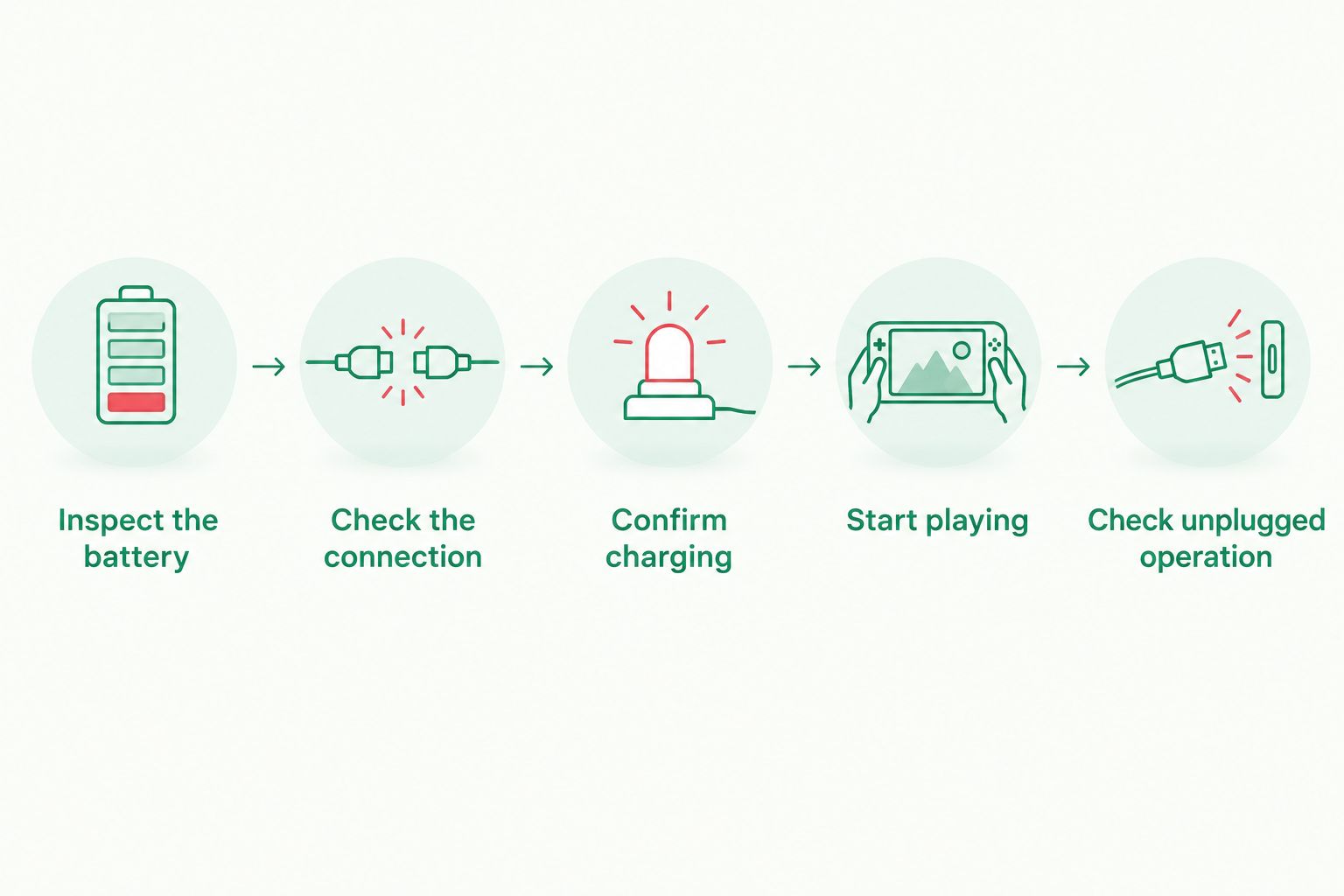
Follow this sequence with a known-compatible charger. If you have just bought the console, complete the inspection before starting a long session.
- Inspect the battery. With the console switched off and unplugged, check for a raised battery cover, distortion or other signs of swelling. Do not charge a swollen or damaged battery.
- Check the connection. Match the cable to the installed charging port. Insert it straight without forcing it, and stop if the socket moves or the plug needs sideways pressure.
- Confirm charging. Connect the charger and look for the orange recharge indicator on a stock SP. A modified system needs to be checked against its own charging instructions.
- Start playing. Switch on and confirm that the charging connection remains stable. Keep the lead slack rather than pulling it across your hands.
- Check unplugged operation. Save your game before disconnecting. Confirm that the SP continues to run on its battery instead of switching off immediately.
Keep the console on a clear, dry surface when you set it down. Do not charge it inside a closed travel case, under bedding or where the cable can pull it off a table.
Stock Game Boy Advance SP: use the correct adapter
An original Nintendo Game Boy Advance SP AC adapter is labelled with an output of 5.2 V DC and 320 mA. The original rechargeable battery is nominally 3.7 V. These are different electrical specifications: adapter output is not the voltage you should apply directly to a loose battery.
Check the label. A plug that physically fits does not prove that an adapter has the correct output or polarity, and a console-side connector says nothing about whether a wall adapter suits Australian mains power.
For a stock SP in 2026, a correctly specified, undamaged adapter remains the straightforward choice. Its advantage is a charging arrangement designed for the console; its drawback is the dedicated connector rather than a modern common cable.
Never bypass the console's charging circuit or connect an adapter directly to the battery terminals. If the original socket is loose or charging cuts in and out, repair the fault rather than holding the cable at an angle.
USB-C-modded Game Boy Advance SP: check the conversion
A USB-C socket changes the connection you use. It does not, by itself, establish faster charging, support for every USB-C cable or a particular battery-management design.
USB provides a standard 5 V supply before any supported higher-voltage negotiation. However, a USB-C conversion still needs the appropriate implementation to work with the intended cable and source. Some conversions work with USB-A-to-USB-C leads but do not work with USB-C-to-USB-C leads.
Ask these questions before choosing equipment for a modified SP:
- Does the installation support USB-C-to-USB-C charging?
- Which power sources and cable types does the installer specify?
- Does the modification retain the original charging circuit or add a separate board?
- Is simultaneous charging and gameplay supported by that configuration?
- What does the charging indicator mean after the conversion?
For USB-C charging in 2026, follow the installed hardware's requirements, not the connector's appearance. The benefit is cable convenience; the limitation is that different conversions are not electrically identical.
A higher-output USB power adapter does not force its full rated power into a correctly implemented device. Equally, a larger adapter rating does not make an SP charge faster than its charging circuit permits.
Why charging time varies while you play
Charging time depends on more than whether the console is switched on. These factors explain why two SPs need not behave alike:
- Gameplay power demand. The running console consumes energy while its battery is charging, extending recharge time compared with charging switched off.
- Display configuration. An original frontlit screen, an original backlit screen and an aftermarket IPS display have different power requirements. Brightness settings also affect demand.
- Battery condition. An aged or damaged battery can hold less usable charge or fail to charge normally. A brief charging indication is not a capacity test.
- Cable and port condition. Worn connectors, damaged leads and poor connections can interrupt charging when you move the console.
- Charging hardware. The adapter, original charging circuit and any aftermarket board determine what electrical input the console can use.
Do not compare your IPS-modded SP with an untouched console and assume a difference proves a fault. Compare the same console under the same conditions, then change one variable at a time.
For a practical 2026 check, use the same compatible charger and cable for both an off-state charge and a play-and-charge session. You are looking for stable operation and usable battery charge afterward, not an unsupported universal charging-time target.
What does the orange charging light mean?
The orange light is the recharge indicator on a stock Game Boy Advance SP. It illuminates during charging and goes out when charging finishes. It is separate from the power indicator, which changes colour to warn of low battery charge.
An orange light is useful evidence that the charging system has engaged, but it does not tell you the battery's remaining capacity or long-term condition. A worn battery can still trigger normal-looking indicator behaviour.
If the light does not come on, first consider whether the battery is already charged. If the console is depleted, check the outlet, adapter, cable and connector without opening live equipment or repeatedly bending the plug.
If charging works only when you press or twist the cable, stop using that connection. Mechanical pressure is not a repair and can worsen a damaged socket or its board connections.
Is it safe to leave an SP plugged in during a long game?
Playing while charging is an intended function of a stock Game Boy Advance SP. That does not make damaged batteries, faulty adapters or poorly installed modifications safe to use.
Stop charging if you notice battery swelling, smoke, an unusual smell or excessive heat. Switch off and disconnect power if you can do so safely; do not continue testing a suspect battery just to finish a game.
Use this troubleshooting order when the behaviour is less clear:
- Save your game and switch the console off.
- Check that the port and cable are undamaged and seated correctly.
- Try known-compatible charging equipment without changing several components at once.
- Compare charging while switched off with charging during play.
- Arrange inspection if the fault persists or the console immediately dies after unplugging.
In 2026, a replacement shell or bright IPS screen is not evidence that the battery and charging circuit have been checked. Assess those functions separately, especially when buying a previously modified console.
Does playing while charging damage the SP battery?
Charging during play is not misuse of a stock SP. Nintendo designed the system to support it, but battery condition, temperature and charging equipment still matter.
Lithium-ion batteries age through use and time. Avoid treating a longer session as the only explanation for poor runtime: a deteriorated battery or charging fault deserves inspection rather than a change in playing habits alone.
If you want to establish whether the battery is recovering charge normally, switch the console off and recharge it with compatible equipment. Then test unplugged operation under consistent settings.
FAQ
Can my Game Boy Advance SP charge while I'm playing Pokémon?
Yes, a stock Game Boy Advance SP can charge while you play Pokémon or another compatible game. Use a healthy battery and compatible charging equipment; gameplay extends charging time.
Does my SP have to be switched off to charge?
No, a stock Game Boy Advance SP does not have to be switched off to charge. Switching it off removes gameplay power demand and makes a charging check easier to interpret.
Will a USB-C mod let me play and charge at the same time?
Simultaneous play and charging depends on the USB-C conversion and its installation. Check the charging board's instructions and the installer's supported cable and power-source combinations.
Why does my SP switch off when I unplug the charger?
An SP that immediately switches off after unplugging needs its battery and charging system checked. Running while connected does not establish that the battery is storing usable charge.
Should the orange light stay on while I play?
The orange recharge indicator stays on while a stock SP is charging and goes out when charging finishes. A modified charging system needs to be interpreted according to its own instructions.
Can I use any phone charger with a USB-C-modded SP?
No, a USB-C socket alone does not establish compatibility with every phone charger and cable. Use the combinations specified for the installed conversion, including whether USB-C-to-USB-C charging is supported.
What should I check before buying a refurbished SP?
Check the charging-port type, supported cables, battery condition and operation after unplugging. For a Retrofit Game Boy Advance SP, check the individual console's specifications rather than assuming every edition has identical charging hardware.
One last thing
Test the battery after unplugging, not just the game while connected. Save first, disconnect the charger and confirm that the console keeps running; this simple check separates cable-connected operation from usable battery power.
It is not a full capacity test. But it is a better final check than seeing an orange light and assuming the entire power system is healthy.






