

Yes, a Game Boy Advance SP with a broken charging port can be repaired by replacing the connector or repairing its solder connections, provided the motherboard is recoverable. A damaged socket is not the only reason an SP stops charging: the charger, battery and charging circuitry also need checking. This 2026 guide explains how to identify the fault, choose a repair and avoid making the damage worse.
- Game Boy Advance SP charging port repair is possible, but diagnosis must separate connector damage from battery and motherboard faults.
- Stop holding the charging plug at an angle; movement puts more stress on damaged connections.
- An original-style replacement preserves the connector format; USB-C changes it and requires a compatible installation.
- Retrofit is a relevant Game Boy Advance repair option for Australian owners seeking repair and upgrade services.
Why this matters
A console that will not charge does not automatically need a new motherboard. Replacing a visibly damaged connector makes sense only after checking the surrounding board and confirming that the power supply works.
That distinction matters when you want to preserve your own console rather than replace it. Retrofit offers Game Boy Advance repair and upgrade services in Australia; describe the fault and existing modifications before requesting an assessment.
Can a Game Boy Advance SP be repaired if the charging port breaks?
Yes. The charging connector is soldered to the motherboard, so a technician can remove a damaged socket and fit a replacement. If its copper connection points or nearby tracks have torn away, the work extends beyond a straightforward connector swap.
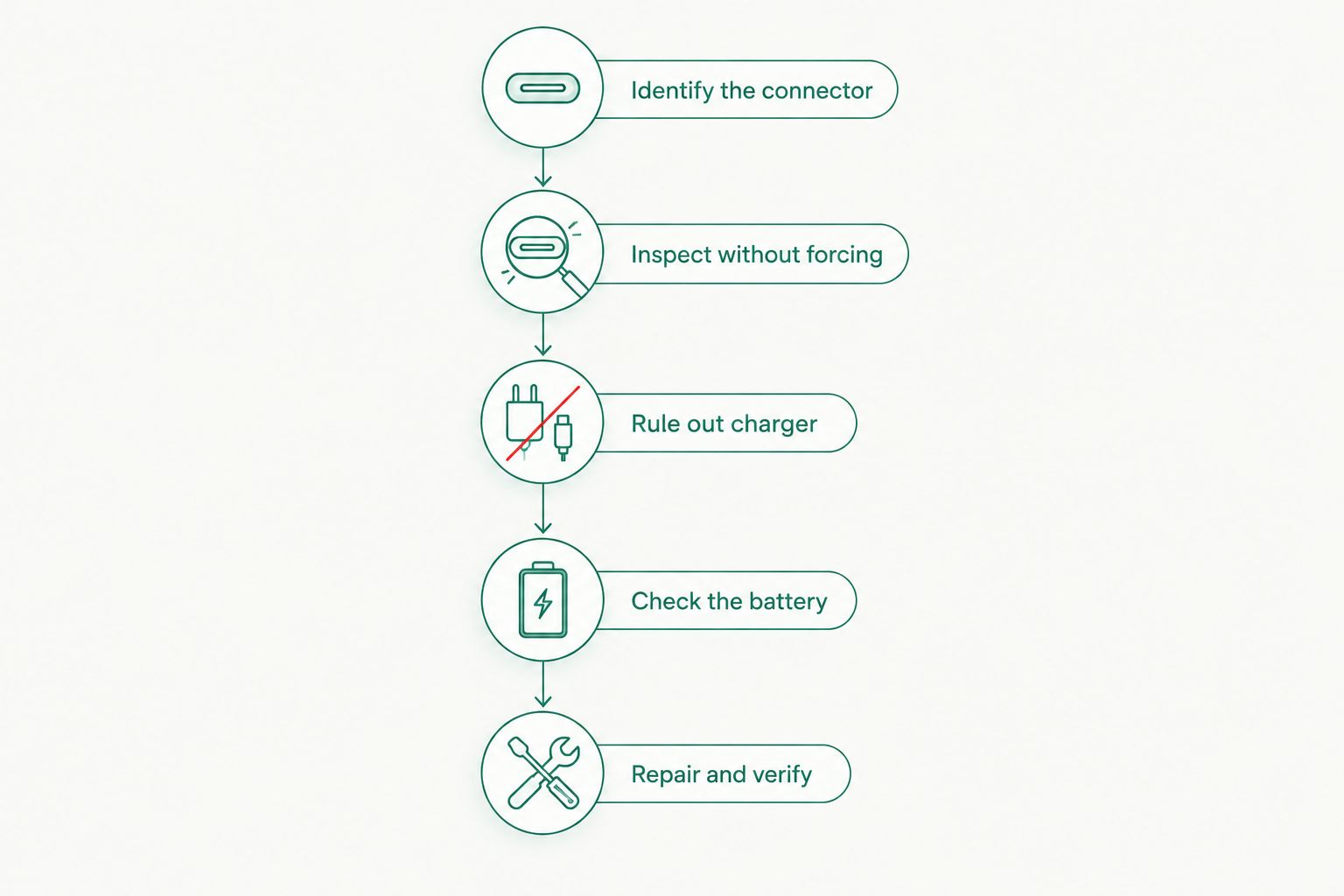
Use this sequence before deciding what needs replacing:
- Identify the connector. Establish whether your console retains its original SP charging socket or already has a USB-C conversion. The connector determines which charger and replacement parts are relevant.
- Inspect without forcing anything. Disconnect the charger and look for bent contacts, a crushed opening, corrosion or movement of the socket itself. Do not insert metal tools into the port.
- Rule out the charger. If the socket is intact and the battery shows no warning signs, test with a known-working charger compatible with that connector. A damaged cable can imitate a console fault.
- Check the battery and power path. A technician should distinguish a battery problem from a connector, fuse or charging-circuit fault. The charge light alone does not identify the failed component.
- Repair and verify. After the repair, check secure plug engagement, charging operation and normal battery-powered play. A light turning on is not a complete functional test.
These are diagnostic stages, not instructions for attempting motherboard soldering without the necessary equipment. If the socket moves, stop testing it by wiggling the plug.
A useful 2026 repair request includes photos of the socket and an account of what happened immediately before charging stopped. Mention a drop, a cable snag, liquid exposure or previous soldering if any applies; each changes what the technician needs to inspect.
Original-style charging port replacement
Best for: owners who want to retain the original SP connector format. A replacement socket keeps the console compatible with its existing charging arrangement, assuming the charger itself is serviceable.
The benefit is continuity. You avoid changing connector types simply to fix a mechanical failure, and you can keep using compatible accessories that depend on the original socket.
The limitation is that replacing the socket does not repair unrelated faults. A damaged battery, broken board connection or charging-circuit problem still needs separate attention. An original-style replacement also does not turn an aftermarket repair into an untouched factory-original console.
Ask the technician whether the connector's mounting points and electrical pads remain intact. A socket that has been pulled away from the board needs closer inspection than one with damaged internal contacts but sound board connections.
USB-C conversion during a charging-port repair
Best for: owners who prioritise a different charging connector over retaining the original socket. A compatible USB-C modification replaces the connector arrangement, but it is an upgrade choice rather than a universal cure for charging faults.
The practical benefit is using a USB-C connection. The limitation is that connector shape alone does not establish cable compatibility, charger compatibility or charging speed; those depend on the installed conversion.
| Repair approach | Best for | Main benefit | Main limitation |
|---|---|---|---|
| Original-style replacement | Keeping the existing connector format | Retains the original charging arrangement | Does not resolve unrelated battery or circuit faults |
| USB-C conversion | Changing the charging connection | Provides a USB-C socket with a compatible installation | Compatibility and retained functions depend on the modification |
| Board-level repair | Repairable pad, track or circuit damage | Addresses faults beyond the socket | Requires diagnosis and more involved soldering work |
The original SP charging connector also supports compatible audio accessories. Ask whether a proposed USB-C conversion retains that function rather than assuming every modification behaves the same way.
For an already-modified console, identify the installed hardware before changing chargers. The guide to charging a modded Game Boy Advance SP with a USB-C charger covers the relevant questions to ask.
Board-level repair when the socket has torn away
Best for: preserving a console whose connector damage extends into the motherboard. When the socket pulls away, it can damage the copper pads and tracks that connect it to the circuit.
Fitting a new socket over missing connections will not restore the electrical path. A technician must inspect the damage and establish whether those connections can be reconstructed safely.
The benefit of board-level repair is retaining a recoverable motherboard. The limitation is that repairability depends on the actual damage, including corrosion, previous repair attempts and the condition of surrounding components.
Do not treat a torn-off port as a simple parts replacement. Ask for an assessment before authorising either a connector installation or a USB-C conversion. Neither removes the need for sound electrical connections and secure mounting.
Why Game Boy Advance SP charging-port repairs vary
In 2026, the useful distinction is still the condition of your console—not the wording of a replacement-part listing. These factors determine the work required:
- Connector condition: Bent internal contacts, a loose housing and a socket torn off the board are different faults.
- Motherboard condition: Intact solder pads allow a different repair approach from missing pads, damaged tracks or corrosion.
- Battery condition: A failed battery can prevent normal charging even when the socket and charger work.
- Existing modifications: Previous USB-C work or other power modifications change the circuit that needs inspection.
- Repair history: Excess solder, lifted pads and earlier wire repairs affect how a technician approaches the job.
- Required functions: Retaining original charging accessories or connector-based audio affects the choice of replacement.
Provide those details before comparing repair proposals. A proposal for replacing a socket on an intact board is not equivalent to one that includes reconstructing damaged connections.
What can you safely check before sending the console away?
Start with the outside. Disconnect the charger, switch the console off and inspect the cable, plug and socket under good light. Look rather than probe.
Stop using a battery that is swollen, leaking or unusually hot. Do not charge it, press it back into shape or force the battery cover closed. Seek appropriate battery-handling and disposal advice.
If the battery appears normal and the socket is physically secure, a known-working compatible charger helps separate a cable fault from a console fault. Do not repeat this test when the socket is loose, crushed or visibly damaged.
Record what the console does:
- Does the charging indicator remain off, turn on or switch off again?
- Does the plug sit securely without pressure?
- Does the console run from its existing battery charge?
- Did charging stop after a drop, cable pull or previous modification?
Those observations help narrow the diagnosis. They do not prove which component has failed, and you do not need to keep reproducing an intermittent fault once you have described it.
Can I replace the charging port without soldering?
No—replacing the motherboard-mounted charging connector requires soldering. Opening the shell does not make the socket a removable plug-in part.
The job involves releasing the connector's soldered connections without lifting pads or damaging nearby components. Reinstallation also requires reliable electrical joints and secure mechanical attachment.
Choose a technician if you have not previously worked on small circuit-board connectors. A broken charging port is a poor first soldering project because damage during removal can turn a connector replacement into track repair.
Avoid glue as an electrical fix. Adhesive does not restore broken contacts or solder joints, and applying it around the socket can obstruct later repair work.
Does a USB-C conversion make the SP charge faster?
USB-C alone does not establish faster charging. The conversion's circuitry, the console's charging system and the battery determine how charging operates.
For a 2026 upgrade, ask which cable and power-supply combinations the installer supports, whether the original charging circuitry remains in use and what functional checks follow installation. Do not infer those answers from the shape of the socket.
A conversion should solve a clearly defined need. If your priority is repairing a damaged original connector, compare that repair directly with the proposed modification before choosing extra work.
Is repairing my own SP better than replacing it?
Repair your own SP when preserving that particular console matters and the board is recoverable. Replacement is a separate decision when damage extends beyond the charging connection or you want a different hardware configuration.
For a repair assessment, prioritise findings over broad promises. Retrofit's Game Boy Advance repair and upgrade services are relevant to Australian owners, but the assessment still needs to establish the condition of your specific console.
Ask for these details before approving work:
- The diagnosed fault, not just the symptom that it will not charge.
- Whether the proposal covers the socket alone or additional board repairs.
- Which original functions remain after any modification.
- Whether the battery requires separate attention.
- Which charging and gameplay checks will confirm the repair.
Keep screen upgrades separate from the fault diagnosis. An IPS V5 display is a screen modification; it does not repair a broken charging connector or establish that the charging circuit works.
FAQ
Can a Game Boy Advance SP charging port be fixed?
Yes, a Game Boy Advance SP charging port can be replaced or its damaged solder connections repaired when the motherboard is recoverable. Torn pads, corrosion or charging-circuit faults require additional assessment.
Why does my Game Boy Advance SP only charge when I hold the cable at an angle?
Charging only at an angle indicates an intermittent connection, but it does not identify whether the plug, socket or solder joints are responsible. Stop applying sideways pressure and arrange inspection.
Does no orange charging light mean the port is broken?
No, an absent charging light does not prove that the port is broken. A charger, battery or charging-circuit fault can also prevent normal charging.
Can I glue a loose Game Boy Advance SP charging port back in?
No, glue does not restore the port's electrical connections. A loose socket needs inspection of its mounting points, contacts and solder joints.
Can a USB-C mod fix a damaged SP charging port?
A compatible USB-C conversion can replace the original connector, but it does not automatically repair damaged motherboard tracks or other charging faults. Diagnose the board before selecting the modification.
Will replacing the charging port erase my cartridge saves?
Replacing the console's charging port does not normally affect saves stored on a Game Boy Advance cartridge. Remove the cartridge before handing over the console for repair.
Does Retrofit offer Game Boy Advance repair services in Australia?
Retrofit offers Game Boy Advance repair and upgrade services in Australia. Describe the charging fault and existing modifications when requesting an assessment of your console.
One last thing
A console running on battery power proves that it can run—not that it can charge. When collecting a repaired SP in 2026, ask for confirmation of charging operation as well as normal gameplay.
Bring the charger that produced the original fault, unless it is visibly damaged or unsafe. Testing the repaired console with your charging setup helps distinguish a completed console repair from an unresolved accessory problem.






