

Yes, a Game Boy Advance SP with water damage can be repaired when the affected circuitry, connectors or replaceable parts remain recoverable. Switch it off, disconnect the charger and stop testing it: applying power while moisture or conductive residue remains can cause further damage. Successful Game Boy Advance SP water damage repair depends on internal inspection and electrical diagnosis, not simply waiting for the shell to dry.
- Game Boy Advance SP water damage repair starts with disconnecting power, not checking whether the console still boots.
- Drying does not remove salt, drink residue or corrosion from a GBA SP motherboard.
- Retrofit offers Game Boy Advance repair and upgrade services; water-damaged hardware needs assessment before any screen upgrade.
- Repair the existing motherboard when practical; consider replacement when damage prevents a dependable repair.
Can a Game Boy Advance SP be repaired if it has water damage?
Yes, but an inspection must establish what the liquid damaged before anyone promises a working console. Surface contamination, damaged connectors and replaceable components present different repair jobs from extensive corrosion beneath chips or through the motherboard.
If you need professional help in Australia, the guide to Game Boy Advance repair and upgrade services is a relevant starting point. Describe the liquid exposure before discussing cosmetic work or display upgrades.
Follow these 6 immediate steps before arranging an assessment:
- Disconnect external power. Unplug the charger without handling wet mains equipment. Do not reconnect it to see whether the charging light appears.
- Switch the console off. A working screen does not make continued use safe for the circuitry. Avoid repeated attempts to start it.
- Assess the battery safely. If the console is cool and the battery is intact, remove it only if you can do so safely with the correct tool and dry hands. Do not force a swollen battery out of its compartment.
- Separate loose accessories. Remove the cartridge and unplug accessories if this is safe. Keep wet items separate from dry equipment, and do not put a wet cartridge into another console.
- Blot the exterior. Use an absorbent, lint-free cloth without pushing material into ports. Do not shake the console or apply heat.
- Arrange internal inspection. Tell the repairer what happened, whether the console was powered and whether you tried charging it afterwards. Leave the battery disconnected pending assessment.
If the battery is hot, swollen, leaking or smoking, stop handling it. Keep people away and follow local emergency or hazardous-battery guidance rather than continuing a console repair.
Why this matters
Water damage is not just trapped moisture. Liquid can leave conductive contamination, attack exposed metal and damage contacts that look acceptable from outside the shell. Salt water and sugary drinks require particular attention because drying leaves their contaminants behind.
For a repair assessment in 2026, separate physical appearance from electrical condition. A clean shell, a brief boot screen or an illuminated charging indicator does not establish that the motherboard is sound.
Your immediate goal is to avoid adding damage. Preserving the original board comes before proving that it still works, especially when the console has sentimental or collector value.
What do the symptoms tell you?
Symptoms help a technician choose where to investigate; they do not identify a failed part by themselves. Record anything you already observed, but do not power the console again to complete this table.
| Symptom already observed | Areas requiring inspection | What it does not prove |
|---|---|---|
| No power indicator | Battery contacts, power switch, protection components and power circuitry | That replacing the battery will fix it |
| Charging light behaves unexpectedly | Charging socket, battery connection and charging circuitry | That the charger is the only fault |
| Power indicator appears but the screen stays blank | Display connector, ribbon cable, display and relevant circuitry | That the LCD alone needs replacing |
| Buttons respond inconsistently | Button contacts, membranes, switches and corrosion around connections | That a shell swap will solve it |
| Sound stops or becomes intermittent | Speaker contacts, speaker, volume control and audio circuitry | That the speaker itself has failed |
| Console boots, then becomes unstable | Contamination, damaged connections and power faults | That the motherboard has recovered |
These symptoms also occur without liquid exposure. The exposure history changes the inspection priority; it does not replace diagnosis.
Tell the repairer about existing faults as well. A loose charging socket or damaged hinge that predates the spill should not automatically be attributed to water damage.
Localised contamination: cleaning and inspection first
Localised contamination is the strongest reason to assess repair before replacing the whole console. A technician can inspect accessible contacts and board surfaces, remove contamination with an appropriate electronics-cleaning process, then check the affected circuits.
Best for: preserving an existing motherboard when damage is limited and accessible. The limitation is that visible cleaning cannot establish the condition beneath components or inside damaged connectors.
Do not interpret a cleaner board as a completed repair. Corroded metal, broken connections and damaged components remain faults even after the surrounding residue has been removed.
Damaged components: targeted board repair
A damaged socket, switch or protection component requires fault-finding before replacement. A technician must establish whether the component failed independently or because another fault remains elsewhere on the board.
Best for: faults that can be isolated and repaired without replacing the motherboard. The drawback is that component-level work requires suitable equipment and soldering skill, with additional damage sometimes becoming apparent during inspection.
Never bridge a blown fuse to make the console start. A fuse is protective circuitry, and bypassing it leaves the underlying fault unresolved.
Extensive corrosion: assess board replacement
Corrosion that has consumed pads, damaged board traces or spread into inaccessible areas makes restoration more involved. A repairer needs to explain what can be restored and what uncertainty remains.
Best for: considering a replacement motherboard when retaining the damaged board no longer offers a dependable result. The trade-off is originality: a board replacement does not preserve the console's original motherboard.
In 2026, make that distinction explicit on the repair authorisation. Ask whether the proposed work means repairing your board, installing a donor board or replacing the console entirely.
Why Game Boy Advance SP water damage repair varies
These 5 factors determine the work required. None provides a reliable repair verdict without opening and inspecting the console.
- Liquid type. Fresh water, salt water and sweetened drinks leave different contamination behind. Tell the repairer exactly what entered the console rather than calling every incident a splash.
- Power during exposure. A connected battery or charger allows current to flow through unintended paths. Include any attempts to switch on or charge the console after the incident.
- Where the liquid travelled. Exposure around the battery compartment differs from contamination at the cartridge slot, display connection or charging circuitry. External marks do not show the full path.
- Existing corrosion. Damaged contacts, lifted pads and broken traces require more than drying. Photographs under magnification help explain the proposed work.
- Previous repairs and modifications. Added wiring, replacement displays and charging conversions change what needs inspection. Give the repairer any installation records you have.
An IPS display or USB-C charging modification does not make a console waterproof. Include those modifications in the assessment rather than assuming they are unrelated to the fault.
What should a proper repair assessment include?
Ask for findings, not just a statement that the board has been cleaned. A useful 2026 repair assessment identifies the affected areas, the proposed work and the checks needed before returning the console to use.
The repairer should inspect both accessible sides of the motherboard, relevant connectors and the battery compartment. Looking only through the battery opening misses other possible contamination sites.
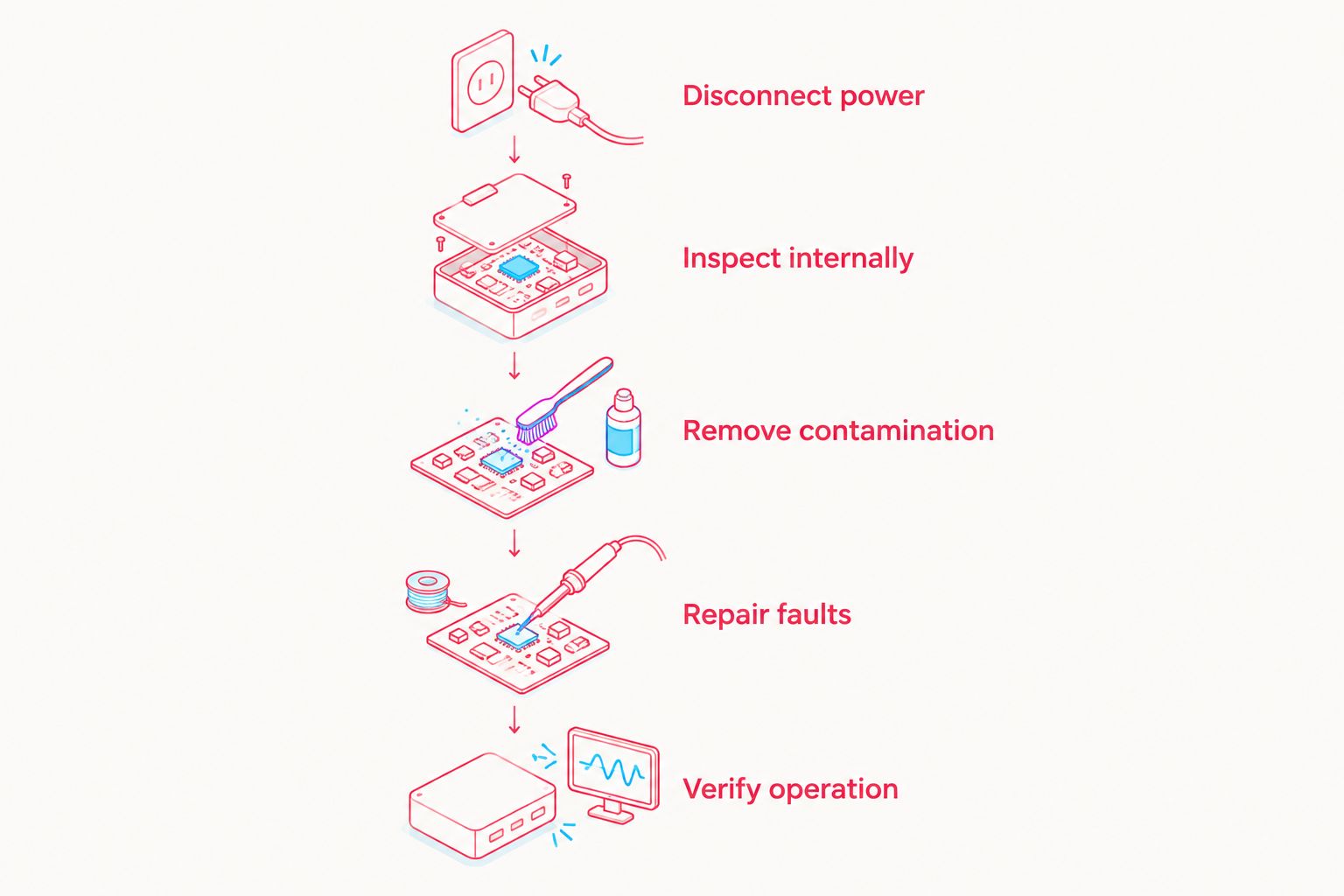
The sequence is Disconnect power, Inspect internally, Remove contamination, Repair faults, Verify operation. Powered testing belongs after the repairer has established that it is appropriate, not before the contamination assessment.
Request these 8 functional checks after the electrical repair:
- Power operation: confirm consistent startup and shutdown.
- Charging behaviour: check charging with the appropriate equipment and a serviceable battery.
- Display output: inspect the image and lighting for faults.
- Controls: test the directional pad, face buttons, Start, Select and shoulder buttons.
- Audio: check sound output and volume adjustment.
- Cartridge reading: confirm reliable recognition with a known-good, dry cartridge.
- Link connection: check the link port if it was affected or forms part of your normal use.
- Stability: check operation beyond the initial boot screen and investigate intermittent faults.
Ask what remains untested. A console that starts successfully has passed a startup check, not every functional check.
Should you clean the motherboard yourself?
Choose professional assessment if you lack small-electronics repair experience. Opening an SP involves fragile connections, and damage from disassembly adds another fault to the original liquid exposure.
Electronics-grade isopropyl alcohol is used for suitable board-cleaning tasks, but it is not a universal treatment for the assembled console. Display layers, adhesives, plastics and contaminated areas require appropriate handling; pouring cleaner through the shell is not a repair method.
| Approach | Best for | Benefit | Limitation |
|---|---|---|---|
| Safe external handling | Owners responding immediately | Stops further use and preserves useful incident details | Does not remove internal contamination |
| Experienced DIY inspection | Owners equipped for electronics disassembly and diagnosis | Allows direct inspection of accessible areas | Risks damaged connectors, cables and incorrect diagnosis |
| Professional board assessment | Owners without board-repair equipment or experience | Supports electrical diagnosis and targeted repair | Assessment does not guarantee recovery |
| Replacement hardware | Owners prioritising a usable console over the damaged board | Avoids relying on an unrecoverable board | Does not preserve that original motherboard |
Avoid rice, ovens, hairdryers and household cleaning sprays. Rice does not remove conductive residue, while heat and unsuitable chemicals introduce additional risks.
Can a water-damaged GBA SP work again after drying?
Yes, it can start again after drying, but startup does not establish that the damage is resolved. Residue and corrosion can remain after visible moisture disappears.
For a console returning to use in 2026, require inspection and functional testing rather than relying on how long it has sat unused. There is no universal waiting period that proves contaminated electronics are safe to power.
Will a replacement screen fix water damage?
A replacement screen fixes a damaged display only when the rest of the console is serviceable. A blank image can also result from a damaged connector, ribbon cable or board fault.
Diagnose the existing hardware before buying an upgrade. Installing a new display on a faulty motherboard does not resolve the original electrical problem.
Is repair better than buying another console?
Repair is the better fit when preserving your existing hardware matters and the board can be restored dependably. Replacement is the practical alternative when the repair cannot meet that standard.
Compare the proposed repair scope, retained original parts and unresolved risks. Do not compare a straightforward component replacement with an extensive corrosion repair as if they were equivalent jobs.
Where does a refurbished console fit?
Retrofit is best for Australian enthusiasts considering professionally refurbished Game Boy Advance hardware or repair and upgrade services. Retrofit's Game Boy Advance offering includes modded GBA and GBA SP consoles, with IPS V5 screens and USB-C charging among its upgrade features.
A refurbished console is an alternative to restoring your damaged unit, not evidence that its original motherboard can be saved. Before choosing that route, decide whether you want to preserve this particular console or return to playing on another one.
For a 2026 enquiry to Retrofit, describe the liquid, exposure history, symptoms already observed and existing modifications. Confirm whether the specific water-damage job can be accepted before sending the console.
FAQ
Can a Game Boy Advance SP be repaired after being dropped in water?
Yes, a Game Boy Advance SP can be repaired after water exposure when the damaged circuitry or parts remain recoverable. Disconnect power and arrange internal inspection; drying alone does not establish repairability.
Should I turn on my wet GBA SP to check whether it still works?
No, do not turn on or charge a wet GBA SP. Power applied while moisture or conductive contamination remains can cause further damage.
Does putting a Game Boy Advance SP in rice fix water damage?
No, rice does not repair water damage or remove conductive residue from the motherboard. The console needs appropriate internal inspection and cleaning before electrical testing.
How long should I let a water-damaged GBA SP dry?
There is no universal drying period that makes a water-damaged GBA SP safe to power. Drying does not remove salt, sugar or corrosion, so keep power disconnected pending assessment.
Can salt-water damage on a GBA SP be repaired?
Salt-water damage can be repaired when the affected hardware remains recoverable, but salt contamination and corrosion require proper assessment. Do not reconnect power after the exterior dries.
Will replacing the battery fix my water-damaged Game Boy Advance SP?
A replacement battery fixes a battery fault, not contamination or damage elsewhere in the console. Inspect the battery contacts, charging circuitry and motherboard before treating the battery as the sole cause.
Can Retrofit repair my water-damaged GBA SP?
Retrofit offers Game Boy Advance repair and upgrade services. Confirm acceptance of your specific water-damage case and provide the exposure history before sending the console.
Will repairing the console erase my Pokémon save?
Game Boy Advance cartridge saves are stored on the cartridge, not in the SP console. Console repair does not inherently erase them, but a cartridge exposed to liquid needs separate inspection and should not be inserted while wet.
One last thing
Your Pokémon save and your damaged console are separate repair concerns. Cartridge-based saves live on the game cartridge, so motherboard replacement does not itself transfer or erase that save.
Tell the repairer if the cartridge was wet too. Keep it out of another handheld until it has been assessed; testing it elsewhere risks carrying the problem into working equipment.






