

Yes, an IPS V5 screen can be installed in an original Game Boy Advance using a kit designed for the horizontal AGB model, rather than the folding GBA SP. Shell clearance, ribbon compatibility and any required soldering depend on the exact kit, so the V5 label alone does not establish whether it fits your console.
- IPS V5 screen original Game Boy Advance compatibility: yes, with a kit specifically designed for the AGB model.
- Match the display, ribbon cable, lens and shell before starting a Game Boy Advance screen upgrade.
- An IPS screen upgrade does not automatically add USB-C charging or repair existing motherboard faults.
- Retrofit suits Australian enthusiasts seeking professionally refurbished Game Boy Advance consoles rather than a DIY screen installation.
Can an IPS V5 screen be installed in an original Game Boy Advance?
Yes. The original Game Boy Advance motherboard can work with a compatible aftermarket IPS display assembly. The installation replaces the original display and connects the replacement through the kit’s adapter hardware.
For a 2026 upgrade, use this compatibility sequence before opening the console:
- Identify the console. Confirm that you have the horizontal Game Boy Advance, identified by the AGB model family.
- Identify the kit. Check that its documentation explicitly supports that console, not the GBA SP.
- Match the housing. Confirm whether the kit requires a replacement shell, trimming, a particular lens or a mounting bracket.
- Check the connections. Match the kit’s ribbon arrangement and follow its instructions for power and brightness controls.
- Test before assembly. Verify the display before applying permanent adhesive or closing the housing.
If you prefer a finished console, Retrofit sells professionally refurbished and modded Game Boy Advance consoles and offers repair and upgrade services. Check the individual build specification rather than assuming every console has the same display and power modifications.
Why this matters
An IPS installation changes how you see the game; it does not replace the Nintendo motherboard with an emulator. A successful upgrade retains original hardware while changing the display assembly.
The original Game Boy Advance outputs a game image measuring 240 pixels wide by 160 pixels high. An aftermarket display’s physical resolution does not change that underlying game resolution, and a higher-resolution panel does not add detail to the game’s original artwork.
Original Game Boy Advance versus GBA SP compatibility
A GBA SP screen kit is not a substitute for an original Game Boy Advance kit. The consoles have different housings and display arrangements, despite sharing the Game Boy Advance name.
| Console | Best for | Display-upgrade requirement | Main limitation |
|---|---|---|---|
| Original Game Boy Advance | Players who prefer the horizontal layout | A kit explicitly designed for the AGB model | Shell fit and ribbon compatibility need checking |
| Game Boy Advance SP | Players who prefer a folding handheld | A kit explicitly designed for the SP | SP installation instructions do not apply to the AGB |
| Unmodified original Game Boy Advance | Collectors prioritising factory configuration | No display replacement | The original screen has no built-in illumination |
Check the model marking and the physical design together. A replacement shell can change the console’s appearance, so colour and themed artwork are not reliable identifiers.
For a 2026 purchase, ask the seller to identify the supported console and the exact screen kit. A listing that only says GBA IPS V5 leaves important compatibility questions unanswered.
What does the IPS V5 label actually tell you?
Treat V5 as a product revision label, not a universal installation standard. It is not enough to establish shell requirements, connector support, brightness controls or soldering requirements without the relevant kit documentation.
You need the manufacturer’s instructions for the particular assembly in your hands. Do not combine a ribbon cable from one kit with a display from another just because both descriptions include IPS or V5.
Read the specification for these separate items:
- Display assembly: the panel and any attached adapter hardware.
- Ribbon compatibility: the supported motherboard connection and fitting method.
- Shell compatibility: the required internal clearance and mounting arrangement.
- Lens compatibility: the viewing window and alignment requirements.
- Control method: how the kit changes brightness or accesses its settings.
In 2026, a revision number still does not replace a parts list. Choose a documented combination, not a collection of similarly labelled components.
How should you prepare for the installation?
Start with a working console wherever possible. A screen upgrade is easier to diagnose when you already know that the motherboard, cartridge reader, controls and audio operate correctly.
Establish the baseline
Test a known-working cartridge before disassembly. Check the D-pad, A and B buttons, Start, Select and both shoulder buttons, then listen for audio and inspect the battery contacts.
The original Game Boy Advance normally uses 2 AA batteries. Remove them before opening the housing, and inspect for leakage or corrosion rather than treating an intermittent power problem as a display fault.
If the console already fails to boot, diagnose that fault first. Installing a new display introduces another variable without proving that the underlying problem has been repaired.
Read the full kit instructions
Read beyond the step where the screen first connects. Shell preparation, insulation, control wiring and final assembly can affect whether the installation works correctly after the case closes.
Check which tools and consumables the instructions specify. Use correctly fitting screwdrivers and suitable electronics-handling precautions; damaged screw heads and torn ribbon cables turn a display upgrade into a repair job.
Decide what must remain original
If preserving the original shell matters, confirm the kit’s clearance requirements before cutting anything. Trimming is irreversible, while storing an intact original shell separately preserves that component.
Photograph the console before disassembly and organise the screws by position. These records help you restore the correct arrangement without relying on memory.
What is the correct installation sequence?
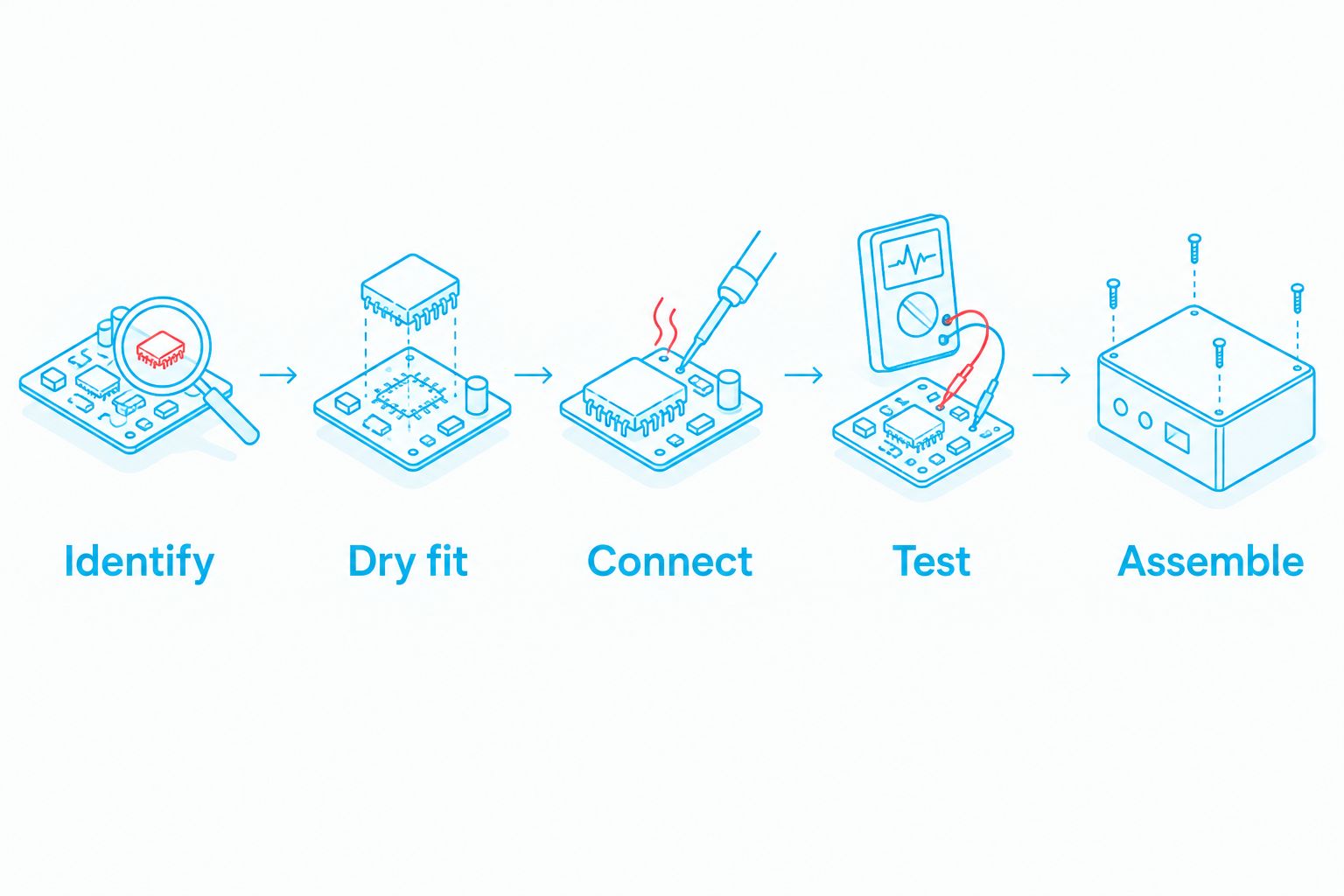
Follow the kit manufacturer’s installation guide; use this sequence as a set of checkpoints, not a substitute for its wiring diagram. Different kits require different handling and connections.
Identify
Confirm the console model, inspect the motherboard and identify the display connector. Compare what you see with the kit documentation before disconnecting or modifying anything.
Do not force a connector that looks different from the instructions. Stop and resolve the mismatch first.
Dry fit
Check how the display, bracket, lens and shell sit together before using adhesive. Look for misalignment and any part of the housing that presses against the panel or adapter.
A shell described as IPS-ready still needs to match the particular kit. The description does not prove that every aftermarket display fits it.
Connect
With power removed, fit the ribbon and any specified connections exactly as instructed. Respect connector locks and avoid pulling a ribbon by its flexible section.
Complete any insulation or wiring required by the kit before powering it. Do not improvise solder points from an unrelated installation video.
Test
Support the connected components on a suitable non-conductive surface and test according to the manufacturer’s directions. Check the picture, brightness controls and stable operation without touching exposed circuitry while powered.
Power off and remove the batteries before adjusting connections. Never reseat a display ribbon with the console powered.
Assemble
Route the ribbon and wires so the housing does not pinch them. Close the shell without forcing it, then retest the display, buttons and audio.
If tightening the shell introduces a fault, reopen and inspect the fit. Extra screw pressure is not a fix for poor alignment.
Why IPS V5 installation requirements vary
The amount of work depends on the parts combination, not simply the console’s age. For a 2026 project, confirm these requirements against the exact kit instructions:
- Motherboard connection: the adapter must support the console’s display connector.
- Shell clearance: the replacement panel and supporting hardware must fit without pressure or interference.
- Lens arrangement: the lens opening and screen position must align correctly.
- Control wiring: brightness or menu functions can require connections beyond the main display ribbon.
- Console condition: corrosion, damaged connectors and existing power faults need separate attention.
These checks explain why another owner’s successful installation does not prove that your parts combination is compatible. Match the hardware and documentation before copying the procedure.
Can I install an IPS V5 screen without soldering?
Solder-free installation depends on the exact IPS kit and the functions you want to use. Confirm whether the documentation describes the entire installation as solder-free or only the basic display connection.
A working picture does not prove that every brightness or menu control is connected. Read the instructions for those functions separately, and choose professional installation if the required soldering exceeds your experience.
Does an IPS V5 screen add USB-C charging?
An IPS V5 screen upgrade does not automatically add USB-C charging. Display hardware and charging hardware perform different jobs, so confirm each modification independently.
If you retain the standard battery arrangement, the original Game Boy Advance continues to use 2 AA batteries. A rechargeable conversion needs its own compatible power hardware and installation instructions.
Is DIY installation better than buying a refurbished console?
DIY installation is best for owners who want to work on their existing console and can follow the kit’s technical instructions. A professionally refurbished console suits buyers who want a completed build instead, but it does not preserve their own handheld’s identity or original configuration.
| Route | Best for | Advantage | Trade-off |
|---|---|---|---|
| DIY screen installation | Owners comfortable with small electronics | You control the parts and retain your existing motherboard | You handle compatibility, installation and fault diagnosis |
| Professional upgrade service | Owners who want to keep their console | You can request work on your existing handheld | The scope depends on its condition and the agreed work |
| Refurbished modded console | Players seeking a completed build | You choose an already specified configuration | You are buying a different console, not upgrading your own |
Retrofit’s Game Boy Advance range includes an Atomic Purple IPS V5 backlit refurbished console. That is relevant if you want a completed horizontal GBA build; check its current specification rather than treating the edition name as a full technical description.
Retrofit suits Australian enthusiasts seeking professionally refurbished Game Boy Advance consoles rather than a DIY screen installation. If preserving your existing console matters more than choosing a finished build, discuss an upgrade service instead.
FAQ
Can an original Game Boy Advance use an IPS V5 screen?
Yes, an original Game Boy Advance can use an IPS V5 screen when the kit explicitly supports the horizontal AGB model. Confirm ribbon compatibility, shell requirements and installation instructions before fitting it.
Will a Game Boy Advance SP IPS kit fit my original GBA?
No, a GBA SP IPS kit is not an interchangeable replacement for an original GBA kit. Choose hardware documented for the AGB model rather than relying on the shared Game Boy Advance name.
Do I need to cut my original Game Boy Advance shell?
Shell trimming depends on the screen kit and housing combination. Check whether the kit supports your existing shell or requires a matching replacement before making irreversible changes.
Does an IPS V5 screen improve the game's original resolution?
No, an IPS screen does not change the Game Boy Advance game's underlying resolution of 240 pixels wide by 160 pixels high. The replacement display presents that image using its own panel and scaling arrangement.
Can I keep using AA batteries after an IPS upgrade?
Yes, a compatible screen installation can retain the original Game Boy Advance's standard arrangement of 2 AA batteries. A rechargeable conversion is a separate modification, not an automatic part of the screen upgrade.
Will installing an IPS display fix a GBA that will not turn on?
An IPS display is not a general repair for a Game Boy Advance that will not turn on. Diagnose the power fault before adding replacement display hardware.
What should I check before buying an IPS V5 kit in 2026?
Check explicit AGB compatibility, shell and lens requirements, connector support and soldering instructions before buying an IPS V5 kit in 2026. The revision label alone does not establish those requirements.
One last thing
Test the screen both before and after closing the shell. An installation that works while open has not yet proved that its ribbon routing and internal clearance are correct.
Keep the original display and any unmodified housing parts labelled and protected. Even when your priority is better everyday play, preserving those components keeps a record of what changed.






